• I want to thank all the members that have upgraded your accounts. I truly appreciate your support of the site monetarily. Supporting the site keeps this site up and running as a lot of work daily goes on behind the scenes. Click to Support Signs101 ...

Roland XJ 640 Nozzle Test Print issue

swirls

New Member
Hello,
My printer has not operated for about 3 month due to storm and power outage.
Before the outage, we had changed the carriage board due to printhead port failure on the board.
We got a new board from China and it worked ok but since the outage we had to get a different heater board.
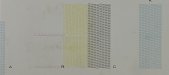
The cyan and yellow heads are good but when they are connected onto the correct carriage board port, the test prints looks off (See image Cyan Port), but when i take the cyan head out and place in the light cyan port on the carriage board, the test print is perfect. I don't think the Magenta head is working properly due to nozzle drop outs but i see similar effects happening as seen on the cyan and yellow test.
See images attached.

I have changed the long trail cables and print head cables since getting these test print results but I still have the issue.
Any assistance is great appreciated.
 

Attachments

  • Cyan port.jpeg
    Cyan port.jpeg
    340.5 KB · Views: 29
  • LC port.jpeg
    LC port.jpeg
    108.4 KB · Views: 26

damonCA21

Active Member
Your black and yellow are overlapping, as are the cyan and magenta. This would point to more to mainboard damage as the heads are not turning on and off at the correct times. It could also have head damage, but its hard to tell what is firing when they don't do it at the correct timings
 

swirls

New Member
Thanks for the feedback. I'll look into it. Any other feedback will be appreciated.
 
  • Agree
Reactions: 1 user
Reseat both ends of the all of the long ribbon cables, as well as the short ribbon cables.
Also make sure all of the ends of all of these cables are fully intact.
 
  • Agree
Reactions: 1 user

damonCA21

Active Member
Normally print carriage boards either work or completely fail so you get no output. Unless it has somehow shorted in some strange way. I would get all the main transistors checked on the head board as RCT says this is the most likely cause
 

swirls

New Member
Reseat both ends of the all of the long ribbon cables, as well as the short ribbon cables.
Also make sure all of the ends of all of these cables are fully intact.
I reseated the cables but the cable seem to be giving me a different issue. I’m trying to see if I can get some new cables.
 

Attachments

  • IMG_3521.jpeg
    IMG_3521.jpeg
    1.7 MB · Views: 15

swirls

New Member
Can someone say the position order in which the trail cables appear on the carriage board and the head board.
 
It is natural, the far left cable from head goes to the front connector on board.
thus, the far right cable, will go to the rear connector on the board
 
  • Agree
Reactions: 1 user

damonCA21

Active Member
From the look of it you may have bad cables and also board damage. Did you look at the ends of the cables for any signs of bent pins
 
  • Agree
Reactions: 1 user

damonCA21

Active Member
And also possibly a bad head. It is probably worth getting a decent tech in now as you can end up doing more damage when you aren't experienced in diagnosing the faults and testing
 

swirls

New Member
It is natural, the far left cable from head goes to the front connector on board.
thus, the far right cable, will go to the rear connector on the board
Let me rephrase.
When the carriage board is in the machine, and you are at the front of the machine by the control panel, the ports at the top/back of the carriage board for the long trail cables, I want to know which port control what color head.
 

swirls

New Member
From the look of it you may have bad cables and also board damage. Did you look at the ends of the cables for any signs of bent pins
The cables doesn’t show any signs of damage but I think I’m going to get some new cables as the current ones are old.
In terms of the board, I’m not sure which of them would have a problem.
 
  • Agree
Reactions: 1 user

swirls

New Member
And also possibly a bad head. It is probably worth getting a decent tech in now as you can end up doing more damage when you aren't experienced in diagnosing the faults and testing
A bad head, hmm. The problem with the Cyan head in its original position is puzzling. That same cyan head works perfect when I put it over into the light cyan slots.
To get a tech to come to the Caribbean is going be a task.
I want to switch around the trail cable that control the light cyan and put that cable on the cyan port that control the cyan head and see how that looks.
I need to know the order in which the ports layout.
 

swirls

New Member
A bad head, hmm. The problem with the Cyan head in its original position is puzzling. That same cyan head works perfect when I put it over into the light cyan slots.
To get a tech to come to the Caribbean is going be a task.
I want to switch around the trail cable that control the light cyan and put that cable on the cyan port that control the cyan head and see how that looks.
I need to know the order in which the ports layout.
Anyone knows the layout order of the trail cables. Which cable control what color?
 

adamfromayr

New Member
Lets say there is 20-40 pins on each side of each cable x the amount of cables sp many pins and it just takes 1 x of them to make your printer wonky

Just one x tiny bent back gold pin is all it takes to get issues, Get a magnifying glass and check all the pins but even at that

its still possible to easily bend a gold-plated pin backwards when installing them again
 
  • Agree
Reactions: 1 user

swirls

New Member
UPDATE ALERT…
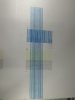
I got another Main Board and the attached pic is the results. I know the magenta, Lm and Lc are not working. I have the new head of them already but wanted to clear up the issue earlier.

The new issue I come across now is, the machine booted up ok in service mode and did the test print but when I try to boot up normally it’s saying “WRONG HEAD IS INSTALLED”
Any thought on this anyone?
 

Attachments

  • IMG_3591.jpeg
    IMG_3591.jpeg
    1.3 MB · Views: 9
Top