• I want to thank all the members that have upgraded your accounts. I truly appreciate your support of the site monetarily. Supporting the site keeps this site up and running as a lot of work daily goes on behind the scenes. Click to Support Signs101 ...

S40600 with Low Usage, Error...

KeithMan

New Member
We bought a new S40600 in 2020, and being a small print shop that mainly focuses on offset printing, we haven't used our printer a whole lot. We probably have used it less than most places would in a single year. Well, this morning I came into work and started to print a poster and had an Error Code 1A39 which according to the service manual online is either a fuse on a board, a cable, or a printhead. I have called about a dozen places near me that service Epson printers, but when I tell them the model, they all say they don't service the Surecolor S series printers.

Can anyone recommend someplace near Kansas City, MO that services Surecolor printers?
 

Ewan yu

www.printersign.com--Printhead,parts,supplier
We bought a new S40600 in 2020, and being a small print shop that mainly focuses on offset printing, we haven't used our printer a whole lot. We probably have used it less than most places would in a single year. Well, this morning I came into work and started to print a poster and had an Error Code 1A39 which according to the service manual online is either a fuse on a board, a cable, or a printhead. I have called about a dozen places near me that service Epson printers, but when I tell them the model, they all say they don't service the Surecolor S series printers.

Can anyone recommend someplace near Kansas City, MO that services Surecolor printers?
According to the official service manual, error 1A39 can be caused by:
1,A blown fuse on a circuit board
2,A loose or damaged cable on the board
3,A failure in the printhead itself

However, based on my experience, I would guess that it’s most likely the printhead that needs to be replaced….
 

KeithMan

New Member
That is what I feared. It was suspicious to me because a few days ago our power flickered off and on about 5 times in rapid succession, but our printer does have a surge protector. Epson kept wanting us to buy a service warranty, but with how little we use it and the fact that our two Epson 9900s have been so reliable, I didn't think it was worth it. :D
 

swordguy3222

New Member
My experience is most likely the head, but with power surge it could be the main board, but you said you have surge protector so it might not be the board. Seeing that you are in Missouri, I would suggest contacting Grimco, they are Epson reseller and a lot of them have service techs that could help with your machine. Head is cheap, and 1hr service for install(max 2 with calibrations).
 

KeithMan

New Member
I reached out to Grimco, but they said they didn't service them. I have gone through about 7 places, and all are saying I need to go directly to Epson. I went to Epson's service locator, and the nearest one is about 4 hours away in Tulsa. I emailed them at 6 am this morning, but haven't heard back. So I emailed Epson tech support to see if they could help. I am half tempted to buy a printhead and try doing it myself. I have replaced a couple of Epson 7600 and 9600 heads in the past, but don't know how complicated it is on this.
 

Ewan yu

www.printersign.com--Printhead,parts,supplier
Changing the printhead yourself isn't difficult, so give it a try! Many of my customers have done it. You can do it too!
 

KeithMan

New Member
Changing the printhead yourself isn't difficult, so give it a try! Many of my customers have done it. You can do it too!
Would you happen to know if it is much cheaper to do it myself? I found the printhead and software for about $2,000, but I have read that the technicians get it at a discounted rate, but of course charge for the travel time and labor.
 

Ewan yu

www.printersign.com--Printhead,parts,supplier
Would you happen to know if it is much cheaper to do it myself? I found the printhead and software for about $2,000, but I have read that the technicians get it at a discounted rate, but of course charge for the travel time and labor.
Of course it will be cheaper ,my price is USD 1800.
Replacing a printhead by yourself for the first time can feel a bit intimidating, but everything has a first time.And after the first time, you’ll realize it’s actually not a big deal.
 

Ewan yu

www.printersign.com--Printhead,parts,supplier
Would you happen to know if it is much cheaper to do it myself? I found the printhead and software for about $2,000, but I have read that the technicians get it at a discounted rate, but of course charge for the travel time and labor.
However, the safest option is to have a technician replace it for you.
Most of my customers are technicians themselves, or people with very strong hands-on skills.Before buying from me, they had already replaced printheads many times on their own.
 

ikarasu

Active Member
I've had 2 seperate technicians fry the main board when replacing the head - when they do it, it's their screw up and they replaced it for free. When you do it... it's $$$$.

If you don't seat the cable 100% properly it can blow the fuse. Now if you know how to solder you can solder a new fuse instead of paying thousands for a new board - but the Epson's are touchy machines when it comes to their internal components, I wouldn't swap a head myself just due to the liability.

Is it throwing a power cord error at all?
 

KeithMan

New Member
I've had 2 seperate technicians fry the main board when replacing the head - when they do it, it's their screw up and they replaced it for free. When you do it... it's $$$$.

If you don't seat the cable 100% properly it can blow the fuse. Now if you know how to solder you can solder a new fuse instead of paying thousands for a new board - but the Epson's are touchy machines when it comes to their internal components, I wouldn't swap a head myself just due to the liability.

Is it throwing a power cord error at all?
Nope. Every time I send a file to it, it will print 6-12 inches and then throw the error code.
 

KeithMan

New Member
However, the safest option is to have a technician replace it for you.
Most of my customers are technicians themselves, or people with very strong hands-on skills.Before buying from me, they had already replaced printheads many times on their own.
I had figured the boards would be pretty cheap, but I should have known better. I missed that you were a supplier. I will be in contact after thinking this over.
 

Ewan yu

www.printersign.com--Printhead,parts,supplier
I had figured the boards would be pretty cheap, but I should have known better. I missed that you were a supplier. I will be in contact after thinking this over.
Yes, I’m a supplier from China. You can ask me anything about China.
 

Ewan yu

www.printersign.com--Printhead,parts,supplier
I had figured the boards would be pretty cheap, but I should have known better. I missed that you were a supplier. I will be in contact after thinking this over.
You can carefully watch how the technician replaces the parts. Over time, you might start thinking about trying it yourself, haha. After all, in the long run, being able to replace some parts on your own can save you a lot of money.
 

netsol

Premium Subscriber
I had figured the boards would be pretty cheap, but I should have known better. I missed that you were a supplier. I will be in contact after thinking this over.
for what it's worth he has been a member since monday...

i have 40+ years experience in this industry before retoromg bit have never touched your model

the repeated power fluctuation worries me, and NO THOSE BOARDS ARE NOT CHEAP

IF you are going to try to change the head yourself, watch a couple videos about static discharge and handling this type of device.
power machine down, UNPLUG FROM MAINS
WALK AWAY for 15-30 minutes and allow capacitors to discharge
use a STATIC DISCHARGE WRIST STRAP

i just don't want to see an already odd story take an ugly turn

i wish i was more familiar with this machine
 

Alebaba

Alebaba
Keith — these are the steps I’d follow. I had a very similar error years ago, and this is how I troubleshot it:
  1. Ignore the ribbon cable. In my experience, the odds of that being the root cause are close to zero.
  2. Pause on the potential printhead issue for now. A replacement head is ~$1,500, so I wouldn’t start there.
  3. Check the motherboard fuses (most likely). This is the most common fix I’ve seen, and you can do it yourself.
Procedure (high level):
  • Power the printer off, unplug it, then press/hold the power button to discharge.
  • Remove the plastic panels per the service manual to access the main board.
  • Use a multimeter in continuity mode and test each fuse. A good fuse will beep / show continuity; no continuity = blown fuse.
  • If you’re unsure which components are fuses: either use the service manual, or take clear photos of the board and have ChatGPT/Gemini point them out.

If you find a blown fuse:
These are tiny micro-fuses and exact matches can be hard to source. The most practical route is to buy a cheap used/for-parts motherboard on eBay (same model or closely related SureColor models with the same board layout), verify its fuses test good, then have a local electronics repair shop swap the fuse. That typically costs far less than a printhead and doesn’t require an “authorized” technician.

Finally: I can hear the frustration—unfortunately you may not find someone who will truly diagnose at component level. The fastest path here is taking control of the basics (fuse testing), and escalating only if the board checks out.

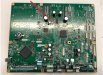
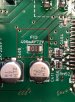
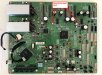
I am attaching an image of my motherboard for the S40600 with the blown fuse. I am also attaching an older model motherboard that I used as a donor board. This one came with two fuses.
 

Attachments

  • Motherboard Fail.jpg
    Motherboard Fail.jpg
    217 KB · Views: 14
  • Motherboard Fail - closeup.jpg
    Motherboard Fail - closeup.jpg
    81.6 KB · Views: 14
  • Motherboard Fail - donor board.jpg
    Motherboard Fail - donor board.jpg
    278.1 KB · Views: 14
  • Agree
Reactions: 1 user

KeithMan

New Member
I greatly appreciate your advice. It does help a little that I am used to working on 3-D printers and computers and my dad was an electrical engineer so he can oversee what I’m doing. I always fear the unknown and inadvertently doing more damage than good so I’m cautious.
 

AES_TLS

New Member
Try calling some larger sign supply distributors instead of just repair shops. I had to do that for a wide format issue last year and they usually have their own techs or a solid list of contractors. It’s better than cold calling random places that only do office printers.
 

KeithMan

New Member
Try calling some larger sign supply distributors instead of just repair shops. I had to do that for a wide format issue last year and they usually have their own techs or a solid list of contractors. It’s better than cold calling random places that only do office printers.
I tried Grimco and a bunch of repair shops for other Epson wide format printers, but none of them would touch this.
 
  • Agree
Reactions: 1 user
Top