So we print a small amount of vehicle wraps and I have kinda always thought the air release on our Avery vinyl has not really been the greatest. Just kinda thought that was a result of laminating, humidity, heat, etc. well we have done a few large topography type designs with matte black backgrounds. Today I was just having some issues and kinda started thinking that it seemed the air release was almost non existent on these full black prints. So I tested a piece of vinyl that had been printed and not printed with the same laminate. Well the air release seemed fine where the black in was not but were we printed solid black it was like there wasn’t even air release there. I kinda have searched and maybe the vinyl is getting over saturated but it looks very good and I let it out gas for a day or so. We have an xc-540 with cmyklclm. Anyone have any input or suggestions to remedy this?

-
I want to thank all the members that have upgraded your accounts. I truly appreciate your support of the site monetarily. Supporting the site keeps this site up and running as a lot of work daily goes on behind the scenes. Click to Support Signs101 ...
You are using an out of date browser. It may not display this or other websites correctly.
You should upgrade or use an alternative browser.
You should upgrade or use an alternative browser.
Seem to be losing the air release on my printed wrap graphics.
- Thread starter Jharris81
- Start date

White Haus
Not a Newbie
If there is a drastic difference between printed and unprinted, I'd say not off-gassing enough or properly.
We had an XC-540 as our first printer and I can't tell you how many times we learned the hard way that heavy ink load/dark prints need extra time to off-gas, especially if you're using canned profiles in Versaworks.
How do you let your prints off-gas?
We built a little off-gas rack/fan/contraption and will still let heavy or critical (solvent) prints off-gas on there for 48hrs if we can afford it. Main thing is that prints are rolled loose so air can get through the layers and ideally have air-flow pulling down, as solvents are heavier than air.
Here is a good thread with some examples, including our ghetto little version: https://www.signs101.com/threads/new-drying-offgassing-box.171818/#post-1599273
We had an XC-540 as our first printer and I can't tell you how many times we learned the hard way that heavy ink load/dark prints need extra time to off-gas, especially if you're using canned profiles in Versaworks.
How do you let your prints off-gas?
We built a little off-gas rack/fan/contraption and will still let heavy or critical (solvent) prints off-gas on there for 48hrs if we can afford it. Main thing is that prints are rolled loose so air can get through the layers and ideally have air-flow pulling down, as solvents are heavier than air.
Here is a good thread with some examples, including our ghetto little version: https://www.signs101.com/threads/new-drying-offgassing-box.171818/#post-1599273
Well I would usually just keep them rolled up off the take up reel. Never had really thought that they wouldn’t out gas properly if left wound up. Yesterday I printed a few panels and stood them up like you have yours with them unwound quite a bit but the only reason I did that was because I was also having issues with the black sticking to the backing paper and ruined a ton of prints. How do you keep your rolls from unwinding while they are stood upright. Doesn’t look like you have tape on them or anything.If there is a drastic difference between printed and unprinted, I'd say not off-gassing enough or properly.
We had an XC-540 as our first printer and I can't tell you how many times we learned the hard way that heavy ink load/dark prints need extra time to off-gas, especially if you're using canned profiles in Versaworks.
How do you let your prints off-gas?
We built a little off-gas rack/fan/contraption and will still let heavy or critical (solvent) prints off-gas on there for 48hrs if we can afford it. Main thing is that prints are rolled loose so air can get through the layers and ideally have air-flow pulling down, as solvents are heavier than air.
Here is a good thread with some examples, including our ghetto little version: https://www.signs101.com/threads/new-drying-offgassing-box.171818/#post-1599273
hybriddesign
owner Hybrid Design
we used to have an xc540 and had the same problem. High ink load and you need to let them outgas forever and even then it's still not that great.
Our Mimaki's were better, the Epson we run now is even better and we barely let them outgas unless it's a crazy saturated print.
Some vinyl's work better than others btw but I remember thinking the same thing with the Roland.
Our Mimaki's were better, the Epson we run now is even better and we barely let them outgas unless it's a crazy saturated print.
Some vinyl's work better than others btw but I remember thinking the same thing with the Roland.
Bonjour à tous, je recherche un OCE Arizona 360 à bon prix pour des pièces détachées. N'hésitez pas à me contacter sur WhatsApp au +225008185928. Merci
TheAngryCanadian
New Member
You’re describing textbook case of over saturating the print. The vehicle art, is solid black ?? I assume with some text ? Why not use color change material and install cut text overlays .withoit seeing art tough to try to help you
So the wrap is a matte black with bronze topography with varying line widths and some gradients. Also having to cut out and lay a topography map over an entire truck bed sound like I would be tearing my hair out by the end. Also having to essentially wrap the truck bed twice.

White Haus
Not a Newbie
We have them on a core, rolled loosely, and little tape tabs on top and bottom so they don't unravel.Well I would usually just keep them rolled up off the take up reel. Never had really thought that they wouldn’t out gas properly if left wound up. Yesterday I printed a few panels and stood them up like you have yours with them unwound quite a bit but the only reason I did that was because I was also having issues with the black sticking to the backing paper and ruined a ton of prints. How do you keep your rolls from unwinding while they are stood upright. Doesn’t look like you have tape on them or anything.
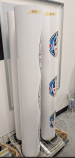

Sometimes when we're feeling REALLY adventurous we'll even note which laminate to use so the person doing the finishing doesn't have to guess..................

So ran a few prints and they have been drying for 3 or so days now. Thank you guys for the advice on standing them up unrolling them loosely. That helped with them sticking to the backer and causing blemishes on the printed surface. I was hoping this was going to help with the air release but I laminated them and it was a tad better but not close to laminated unprinted vinyl. So probably the cause would be to much ink being laid down. Does anyone have some advice or could point me in the direction to adjusting that. I still use versaworks 5.5.
TheAngryCanadian
New Member
Jharris81, I'd recommend you contact your Avery Dennison rep for help. Avery can help you with printer settings. DM me if you have trouble getting with Avery
White Haus
Not a Newbie
If you're still having issues, your vinyl is probably just oversaturated with ink. You may have to look at building your own profiles, which allows you to drastically reduce your ink limits compared to out of the box Roland / Versaworks profiles.So ran a few prints and they have been drying for 3 or so days now. Thank you guys for the advice on standing them up unrolling them loosely. That helped with them sticking to the backer and causing blemishes on the printed surface. I was hoping this was going to help with the air release but I laminated them and it was a tad better but not close to laminated unprinted vinyl. So probably the cause would be to much ink being laid down. Does anyone have some advice or could point me in the direction to adjusting that. I still use versaworks 5.5.
We went from a 100% Roland / Versaworks workflow in the beginning to now running everything through Onyx, and building our own custom profiles using a spectrophotometer. It was a long, expensive road but let us to a point where we can print pretty accurately from all our equipment and don't have to worry about wasting/laying down too much ink.
You're not going to like the price, but building your own profiles is the best solution to the issues you're running into. https://www.xrite.com/categories/calibration-profiling/i1publish-pro-3
That being said, and assuming you don't want to dish out a few grand right now - are you using the correct profile for that media? What are the output values for your black background? If you're using a super dense black build, it may be unnecessary and just oversaturating the vinyl. For example, a nice rich black can be something like 40/40/25/100 depending on media, passes etc.
Well we were having some color issues so we did purchase a i1pro to help fix that issue. I did a new profile which fixed our color issue but in all reality I don’t really know how to color profile. I am trying to learn but no the easiest thing to get help with, or find people to help walk you through it. I just go to work today and was looking into total ink limits and found that the Avery 1105 profile has ink limits set to 180 and the profile that I have been working off of is at 240 so I’d say it way to high.If you're still having issues, your vinyl is probably just oversaturated with ink. You may have to look at building your own profiles, which allows you to drastically reduce your ink limits compared to out of the box Roland / Versaworks profiles.
We went from a 100% Roland / Versaworks workflow in the beginning to now running everything through Onyx, and building our own custom profiles using a spectrophotometer. It was a long, expensive road but let us to a point where we can print pretty accurately from all our equipment and don't have to worry about wasting/laying down too much ink.
You're not going to like the price, but building your own profiles is the best solution to the issues you're running into. https://www.xrite.com/categories/calibration-profiling/i1publish-pro-3
That being said, and assuming you don't want to dish out a few grand right now - are you using the correct profile for that media? What are the output values for your black background? If you're using a super dense black build, it may be unnecessary and just oversaturating the vinyl. For example, a nice rich black can be something like 40/40/25/100 depending on media, passes etc.

DL Signs
Never go against the family
Inks dry through evaporation, and the chemicals in inks are caustic until they're completely dry. Now keep in mind that these caustic solvents are what etch it to the surface of the vinyl and make it stick. If you laminate before they're fully cured, all your doing is sealing those raw chemicals on top of the vinyl, they won't cure, will eat their way into, and soften it, and there go your air channels. The adhesive will actually get stickier in these cases too, negating any benefit to air release. Has way less to do with the vinyl than the inks.
Some brands of ink are worse than others, some printers do a better job of curing, have better heaters, etc... Worst in my experience has always been Roland inks and printers, while they do a great job printing, this was always an issue. I run Mimaki's now, and they're a lot better, don't know if it's their ink formulas, the heaters, or a combination, but it's waay better. Solvent inks are still the best, and there are things you can do to help. Use the right profiles (or tweak them) so you're getting the results you want without over-saturating with ink/ print slower to let the heaters do their job and cure inks more on full coverage prints/ make sure your heaters are hot enough to do the job without causing damage to the vinyl (yes, you can over heat vinyl, which will also cause issues)/ and always let prints cure before laminating. It's all part of the process....
Some brands of ink are worse than others, some printers do a better job of curing, have better heaters, etc... Worst in my experience has always been Roland inks and printers, while they do a great job printing, this was always an issue. I run Mimaki's now, and they're a lot better, don't know if it's their ink formulas, the heaters, or a combination, but it's waay better. Solvent inks are still the best, and there are things you can do to help. Use the right profiles (or tweak them) so you're getting the results you want without over-saturating with ink/ print slower to let the heaters do their job and cure inks more on full coverage prints/ make sure your heaters are hot enough to do the job without causing damage to the vinyl (yes, you can over heat vinyl, which will also cause issues)/ and always let prints cure before laminating. It's all part of the process....
So I got into the media setting for the profile I was using and changed the TIL to 180 from 240 and ran a couple quick prints and first of they were basically dry a lot faster then they use to be. I would imagine that will solve the issue with it sticking to the backer when rolled up on the media roller. also without be fully dry the air release seems to still be there. I can slide the vinyl across a surface without it instantly sticking.
I did not do any calibration of proper way to find the total ink limits. There is a chart in versa works that I printed out for the media profile I am using for total in limits but I am not sure how to read it. Does anyone have any experience with this charts?
Thank you all for your help. I learn something new every time im on here and it is great that people are willing to help and not bash people that do not know something.
I did not do any calibration of proper way to find the total ink limits. There is a chart in versa works that I printed out for the media profile I am using for total in limits but I am not sure how to read it. Does anyone have any experience with this charts?
Thank you all for your help. I learn something new every time im on here and it is great that people are willing to help and not bash people that do not know something.