• I want to thank all the members that have upgraded your accounts. I truly appreciate your support of the site monetarily. Supporting the site keeps this site up and running as a lot of work daily goes on behind the scenes. Click to Support Signs101 ...

New Guy Set up Onyx to make cut registration dots?

ProdPrintMan

New Member
New guy here. thanks for your knowledge, I have been looking thru the forum and learning a lot.

Onyx Thrive 19 to Multicam Router using enRoute.

is there a way to set up Onyx to auto generate registration cut dots? I have googled and googled and I have used a bit of chat gpt and google ai and I am missing something I think. I am thinking I may need an add-on for Onyx to allow Onyx to make those cut dots and save a cut file for enRoute to run on our Multicam. But I also feel like that add-on may be for running the Multicam straight from the Onyx rip. that is not what we need.

Our goal is to set up hot folders for our different substrates for our HP flatbed, and for Onyx to then create the print file with the needed dots, save the cut file to a designated cutter folder on the server, then be able to open those cut files in our enRoute software to cut on the Multicam.

that all make sense? bare with me as this is a bit of a new issue that has been asked of me to figure out...and it would be a great time saver for the shop and the design room alike! thanks!
 

balstestrat

Problem Solver
Yeah you select the cutter and you get your file, pretty simple at the end.
You need flatbed cutter on your license tho.
 

ProdPrintMan

New Member
Yeah you select the cutter and you get your file, pretty simple at the end.
You need flatbed cutter on your license tho.
I have the Multicam as a cutter I can add in Onyx, but there are no settings anywhere that I can select the dots, spacing, etc, which it sounds like I should be able to do. So I do need that Flatbed Cutting Option Add-on then? It kinda sounded like that was only if you wanted to run the router directly from Onyx, but is that not the case? you need that add-on to also be able to add the cutter to Onyx, too? trying to figure out if we need to buy the $1800 add on. was hoping not.
 

Tatonka

New Member
I don't think there's an add-on (but I could be wrong), as long as you select the cutter in the file settings, it should automatically create the dots. Especially when using Thrive. You can dig into the settings in the cutters in Onyx (I think it's File>manage cutters) to determine what kind of workflow (mark type, barcode type, etc) you want it to use, and then in CutServer you tell it where to send it. I think it would be a pain to have it send it to different folders based on substrate. Generally it's set up for each cutter to have a folder on the server if you're using a barcode. For example, I have a folder for our Summa S2, and one for our Summa F1612. And then I have quicksets set up to select the cutter automatically depending on what I'm doing.
 
  • Agree
Reactions: 1 user

Caren Hines

New Member
I don't think there's an add-on (but I could be wrong), as long as you select the cutter in the file settings, it should automatically create the dots. Especially when using Thrive. You can dig into the settings in the cutters in Onyx (I think it's File>manage cutters) to determine what kind of workflow (mark type, barcode type, etc) you want it to use, and then in CutServer you tell it where to send it. I think it would be a pain to have it send it to different folders based on substrate. Generally it's set up for each cutter to have a folder on the server if you're using a barcode. For example, I have a folder for our Summa S2, and one for our Summa F1612. And then I have quicksets set up to select the cutter automatically depending on what I'm doing.

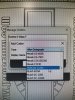
Here's a screenshot of what Tatonka is explaining.
1780411186034.png
 
Last edited:
  • Agree
Reactions: 1 user

ProdPrintMan

New Member
thanks for the explanation and visuals. can you tell me what version of Onyx you are running? we are on 19 currently, which may be of the age where the cutter settings weren't included, where as I think versions like 24 or 25 may have the settings included for flatbed cutting/routing (we have the Summa roll print cutter set up)...correct me if I'm wrong.

Onyx-Cutter-Screen3.jpg

Onyx-Cutter-Screen1.jpg
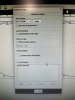
this is what I see when adding the Multicam cutter. it is listed in the available cutters to add, but when I go in to the settings, I don't have any where to add those specifics for marks.
 

Tatonka

New Member
the cutter mark settings are in the main Rip-Queue part of Thrive, not in the Cut-Server part.

Cut-server is where you control how and where the files CUT, the Rip-Queue is where you control how they PRINT.
 

ProdPrintMan

New Member
ok. I think I'm getting somewhere...
multicam_quickset3.jpg
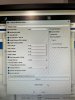
was expecting to see somewhere that says what size dots to make. not seeing that, but maybe it defaults to .25" circle cause that's what it has to be, so you can't change that? Also, will try to find some time in our workflow to send a test file. will I be able to see the dots and barcode/info in the preview in Thrive? or is it something that will show up once it's printed?

thanks everyone for the help! finally feel like I'm making progress. will be amazing if we don't have to buy that add-on and can make version 19 last us a bit longer.
 

Tatonka

New Member
you can see the dots in the preview. I think the size of the dots are pre-set by Onyx, presumably in coordination with the plotter manufacturers. Although twice I've had a bug with an update where the spacing of the dots is different in the settings than it's actually sending to the cut file. That took a call to Onyx and them sending me a patch.
 

ProdPrintMan

New Member
damn. not seeing the dots in the preview. also not seeing a cut file in the folder. guess I need to check more settings. :( still feel like we made some progress, though. thanks!
 

Tatonka

New Member
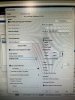
make sure you actually select the cutter in the print settings, where you change the media, resolution, etc for the file.
 

Tatonka

New Member
yep, in there. That should match whatever your cutter is in the "manage cutters" page, which should also match the one in the "cut-server". It doesn't send a cut file until you actually print the job. And since you don't have your cut server set to automatically cut, the file should pop up in cut server waiting for you to press "cut now"
 

bdw99

New Member
Don't wanna high jack this post but quick question with flatbed cutters and registration... If you wanted to cut up a full 4x8 sheet would you have to print on a 5x10 to leave room for reg marks?
 

Tatonka

New Member
Don't wanna high jack this post but quick question with flatbed cutters and registration... If you wanted to cut up a full 4x8 sheet would you have to print on a 5x10 to leave room for reg marks?
not necessarily, but it's probably easier. I'm pretty sure our Summa can read the sheet edges, so as long as you register along the same edges when printing and cutting, it should be reasonably accurate.
 

ProdPrintMan

New Member
are you talking about several nested shapes equaling a 4x8 area? if there is room between the shapes, you could manually add the dots between the shapes instead of around the outside edges for the router to use for registration. just make sure the dots are the correct size (usually .25" black).
 

bdw99

New Member
are you talking about several nested shapes equaling a 4x8 area? if there is room between the shapes, you could manually add the dots between the shapes instead of around the outside edges for the router to use for registration. just make sure the dots are the correct size (usually .25" black).
Like if nested 10 18x24 on a 4x8 sheet and wanted the flatbed to cut it. There would be no space for reg marks I'm assuming..
 

chrisphilipps

Merchant Member
Like if nested 10 18x24 on a 4x8 sheet and wanted the flatbed to cut it. There would be no space for reg marks I'm assuming.
In that scenario you can't have the rip add the marks. If you manually place the marks between copies it will work. We setup a template for our customers using Flexi and the Summa F series where it automatically places the marks and the 18x24 in the correct spot.
 
  • Agree
Reactions: 1 user

bdw99

New Member
In that scenario you can't have the rip add the marks. If you manually place the marks between copies it will work. We setup a template for our customers using Flexi and the Summa F series where it automatically places the marks and the 18x24 in the correct spot.
cool thanks, was just curious
 
Top