
• I want to thank all the members that have upgraded your accounts. I truly appreciate your support of the site monetarily. Supporting the site keeps this site up and running as a lot of work daily goes on behind the scenes. Click to Support Signs101 ...

vicky-s

New Member
Hi everyone,

I wanted to share a simple walkthrough of how I use SignageStudio 2.0 to prepare signage layouts and place LED modules along guide paths.

For this example, I'm working with an APOLLO sign, using face-lit lettering for “APOLLO”

signagestudio_guide_1.jpg

1. Import and clean your artwork​

Start by importing your vector PDF. SignageStudio converts it into editable paths.

Inspect the imported artwork and remove any unnecessary objects or paths before proceeding. A clean SVG makes the rest of the workflow much easier.


2. Set the sign dimensions​

Select all the artwork using Ctrl + A and enter the required width and height.

Keep Keep aspect ratio enabled so the design maintains its original proportions when resizing.

signagestudio_guide_2.jpg


3. Choose the lighting type​

Select the lettering and choose the appropriate guide-path option:

  • Face-lit: LEDs follow the centre of the letter strokes.
  • Halo-lit: Guide paths are positioned inward from the letter edges.
In this example, APOLLO is halo-lit.

signagestudio_guide_3.jpg

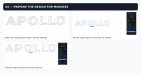
4. Generate and correct guide paths​

Click Create center lines for face-lit lettering. Inspect the generated paths carefully, as some letter shapes may need manual correction.

Select a guide path and use Draw or extend a line to correct incomplete sections or extend an existing path. You can also edit nodes directly.

Once everything looks correct, you're ready for module placement.
signagestudio_guide_4 (1).jpg

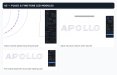
5. Configure and place LED modules​

Select the lettering with completed guide paths. In the properties panel, configure your LED module dimensions.

You can use a predefined module size or create a custom setup by specifying the module length, width and spacing.

Click Place modules to automatically position the modules along the selected guide paths.

After placement, you can select individual modules to add or remove modules, adjust their positions, rotate them, or fine-tune the spacing.

You can also continue editing the guide paths and update the module arrangement when needed.
signagestudio_guide_5.jpg

Final workflow​

Import PDF → Clean artwork → Set sign size → Choose lighting type → Generate guide paths → Correct paths → Configure modules → Place and fine-tune.


I hope this helps anyone getting started with SignageStudio.

I’d love to hear from you! If you run into any issues or have ideas for additional features, please let me know. I’d be happy to extend support and make SignageStudio more useful and easier for everyone to work with.❤️
 
Last edited:

pro-UP

New Member
Magic & beloved word of the year is workflow = ai lately.

What is apollo pood shop? Here's all I found - Apollo Pood means Apollo Store in Estonian. It is a shopping app/online store from Estonia for books, e-books, movies, music, games, gifts, electronics, and entertainment items. It also supports the Apollo Club loyalty program and finding local Apollo stores. Why is free software being promoted here? Why is is free? If's it free, then you are the product or so they say. Well, they're coming for the sign industry. Lol, jokes on them, IYKYK

(prior posting on the forum) - The entire conversation in the prior link reads like an ai response. Here are just a few notable mentions for your enjoyment:
* Hey xxx, fair catch — my bad on that wording.
* That's a limitation worth documenting better on our end.
* absolutely valid point sign depth is critical for accurate module spacing and density calculations, and you're right that we missed it.


Due-diligence check​

ItemWhat I foundAssessment
Real company identityA public developer post identifies the builder only by forum username (“vicky-s” / “vipul-solanki”); the G2 vendor page lists headquarters as N/A. No verified legal company name or address was found for this specific site.Not established
Terms of serviceNo indexed Terms page was found for design.signagestudio.app.Not found
Privacy policy / data handlingNo indexed privacy policy or clear explanation of what uploads, account data, designs, or export data are collected, stored, shared, or retained.Not found
Support contactThe developer invited forum replies, but no verified support email, help desk, business address, or formal support channel was found for this site.Weak / informal only
Independent feedbackThere is one forum thread from March 8, 2026 with early user testing. Users reported a misleading “no account required” claim and failed file imports; the developer responded that an account is required to save work and that some imports were still being fixed. G2 showed 0 reviews.Very limited; early-stage feedback
Account deletionNo public account-deletion process or data-erasure policy was found.Not found
Data exportThe product description claims exports such as BOM, wiring diagrams, DXF, PDF, and CSV. That concerns project output, not necessarily an export of your account data or a complete copy of stored uploads/designs.Partly claimed; unverified

The available evidence points to a new, individual-developer/early-product project, publicly promoted as a free browser-based alternative to LEDWizard. That is consistent with seeking practical feedback and testers, but it does not provide the usual trust signals of an established commercial service. signs101.com
Practical recommendation: Use it only with non-sensitive, disposable test designs unless and until it publishes a verifiable company identity, terms, privacy/data-retention policy, support contact, and account-deletion procedure. Do not upload customer artwork, proprietary CAD/vector files, billing information, credentials, or anything subject to confidentiality obligations.
 
  • Agree
Reactions: 1 user

vicky-s

New Member
Magic & beloved word of the year is workflow = ai lately.

What is apollo pood shop? Here's all I found - Apollo Pood means Apollo Store in Estonian. It is a shopping app/online store from Estonia for books, e-books, movies, music, games, gifts, electronics, and entertainment items. It also supports the Apollo Club loyalty program and finding local Apollo stores. Why is free software being promoted here? Why is is free? If's it free, then you are the product or so they say. Well, they're coming for the sign industry. Lol, jokes on them, IYKYK

(prior posting on the forum) - The entire conversation in the prior link reads like an ai response. Here are just a few notable mentions for your enjoyment:
* Hey xxx, fair catch — my bad on that wording.
* That's a limitation worth documenting better on our end.
* absolutely valid point sign depth is critical for accurate module spacing and density calculations, and you're right that we missed it.


Due-diligence check​

ItemWhat I foundAssessment
Real company identityA public developer post identifies the builder only by forum username (“vicky-s” / “vipul-solanki”); the G2 vendor page lists headquarters as N/A. No verified legal company name or address was found for this specific site.Not established
Terms of serviceNo indexed Terms page was found for design.signagestudio.app.Not found
Privacy policy / data handlingNo indexed privacy policy or clear explanation of what uploads, account data, designs, or export data are collected, stored, shared, or retained.Not found
Support contactThe developer invited forum replies, but no verified support email, help desk, business address, or formal support channel was found for this site.Weak / informal only
Independent feedbackThere is one forum thread from March 8, 2026 with early user testing. Users reported a misleading “no account required” claim and failed file imports; the developer responded that an account is required to save work and that some imports were still being fixed. G2 showed 0 reviews.Very limited; early-stage feedback
Account deletionNo public account-deletion process or data-erasure policy was found.Not found
Data exportThe product description claims exports such as BOM, wiring diagrams, DXF, PDF, and CSV. That concerns project output, not necessarily an export of your account data or a complete copy of stored uploads/designs.Partly claimed; unverified

The available evidence points to a new, individual-developer/early-product project, publicly promoted as a free browser-based alternative to LEDWizard. That is consistent with seeking practical feedback and testers, but it does not provide the usual trust signals of an established commercial service. signs101.com
Practical recommendation: Use it only with non-sensitive, disposable test designs unless and until it publishes a verifiable company identity, terms, privacy/data-retention policy, support contact, and account-deletion procedure. Do not upload customer artwork, proprietary CAD/vector files, billing information, credentials, or anything subject to confidentiality obligations.

I understand where you're coming from, and honestly, I could have explained things better in my earlier posts.

I'm a software developer working on SignageStudio by myself. I'm passionate about the LED signage industry, and this has been a dream project of mine for a while. I don't have a team behind me or a business model I'm trying to push. I'm building it for free because I want to contribute something useful to an industry where designers deal with these challenges every day.

The screenshots and walkthroughs are my attempt to show people how to use the tool. Some of the wording may sound AI-generated because I've used AI to help me put things together, but the development, testing, and feature work are what I'm spending my time on as a solo developer.

Your concerns about privacy and trust are valid. I know those things matter, and I have work to do there. I'm not expecting anyone to trust the tool just because I say so.

If there's a real problem in your daily workflow that you'd like to see solved, I'd genuinely appreciate hearing about it. That's the whole reason I started this project.
 
Last edited:

Smoke_Jaguar

Man who touches printers inappropriately.
Blunt question for you. Is it AI/vibe coded, or do you do actual software development??
 

vicky-s

New Member
Blunt question for you. Is it AI/vibe coded, or do you do actual software development??
I'm a software developer, and yes, I do use AI to help me along the way. I'm building this on my own, so it helps me get things done faster. But the idea came from my interest and wanting to build something useful for sign makers. I'm still working on it and learning from feedback as people try it
 
Top