• I want to thank all the members that have upgraded your accounts. I truly appreciate your support of the site monetarily. Supporting the site keeps this site up and running as a lot of work daily goes on behind the scenes. Click to Support Signs101 ...

Solid Black feels "wet/oily..."

GamecockGrafx

New Member
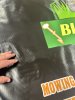
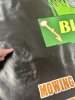
Running an HP 365, just changed all heads and new ink cartridges. When I print large areas of solid black (13oz banner especially) the print feels wet/oily, etc but ink does not smear or come off on hand, etc. Attaching two images - anyone have a clue?
 

Attachments

  • IMG_3633.jpeg
    IMG_3633.jpeg
    2 MB · Views: 42
  • IMG_3632.jpeg
    IMG_3632.jpeg
    1.9 MB · Views: 40

jwlllpl

New Member
Try wiping the substrate with isopropyl alcohol. This works for us if the substrate has been around a bit.
 
That appears to be an incomplete cure. Add an inter-pass delay of ~500ms or increase the cure temp by 8 degrees Fahrenheit (or a combination of both). You could also change the build recipe for black to rely more on K ink and less on CMY. All major RIPs have color replacement tools for this.

This reduces the total fluid deposit (saves ink) and makes it easier to cure. For Latex ink, blacks do not need rich builds to reach deep density (<10L*)
 
Last edited:
  • Agree
Reactions: 1 users

netsol

Premium Subscriber
are you in an urban area?
prone to power brownout?
WE KNOW IT IS HOT
perhaps not fully curing the black ink, maybe you want a line voltage meter?

52ZK69_AS01
 

jwlllpl

New Member
before or after printing?
So sorry.. before. Some of the worst for us can be banner materials. We are located in Florida with a temp and humid controlled environment but that does not account for where the substrates came before us. The prints are completely cured but if I see that pooling look I use the alcohol and it resolves the oily look. Sometimes you can even feel that oiliness before the printing.
 
  • Agree
Reactions: 1 user

Stacey K

I like making signs
This has happened to me also and I wasn't sure what to do, now I will try to increase the temp by 5 degrees!
 
  • Agree
Reactions: 1 user

Bonzai901

New Member
increasing temperature is good and can also print at slower pass so the material has more time to cure, but it takes longer time printing
 

chester215

Just call me Chester.
It seems to happen to me when I use customer supplied art work.
My guess is that the translated black color is over saturating the print.
Replace the color with one from your color palate and see if it still is damp.
 

GamecockGrafx

New Member
Increased the temp 10 degrees and put in an interpass delay - seems like it worked. Another thing I thought of was our HVAC was acting stupid and going on and off, so humidity levels in room were wacky. It's been over 100 degrees a day here in the midlands of SC...need some rain and heat relief! Thank you all for your help
 

Bobby H

Arial Sucks.
Is the black being printed really a straight 100% K black? Some graphics applications (like Illustrator) will intentionally change a 100% K black to a CMYK rich black value automatically when outputting PDF files or printing straight from the application. I'll always dig into the app's settings to make sure blacks are being output accurately rather than being automatically changed. I prefer creating my own rich black values.

P Wagner said:
For Latex ink, blacks do not need rich builds to reach deep density (<10L*)

I can plainly see a difference between an ordinary 100% K black and a rich black value when the artwork is output via a latex printer. 100% K still looks like a very dark gray rather than a deep black.
 
Top