
-
I want to thank all the members that have upgraded your accounts. I truly appreciate your support of the site monetarily. Supporting the site keeps this site up and running as a lot of work daily goes on behind the scenes. Click to Support Signs101 ...
You are using an out of date browser. It may not display this or other websites correctly.
You should upgrade or use an alternative browser.
You should upgrade or use an alternative browser.
SP-300V DX4 HEAD BLACK BANDING
- Thread starter Mj__
- Start date




Jim Hancock
Old School Technician
Run the fill test. It's in the test pattern section in service mode. Watch it closely as it prints and examine the edges after it has finished. It prints each channel individually at settings that are the equivalent of the standard print mode in VersaWorks. It will tell you a lot about the condition of each color channel.
Roland Certified Tech
New Member
if the filter test does not show the banding or you are unable to do the Fill test, try different profiles like generic vinyl 2 and make sure your bidirectional alignment is dead on or print in unidirectional to confirm the bidirectional setting.
Your feed could use a little bit of correction but should not be out enough to cause what you are seeing. Since your test print looks good I would guess a profile issue. Or possibly even a file issue. I sometimes see files that "look" black but when you print it isn't a true black. If you print a black square from a color swatch in design software does it look like that or just this particular file? If your standard black prints like that too then it is a profile issue. If your black prints normal and it is just this file then it could be either. Sometimes converting to a raster helps when colors look fine on screen but print odd but I normally just do that as a last resort.
Roland Certified Tech
New Member
Print the built in VW test print to rule out file issues. Under Printer, Test Print
Fill test, I can still see slight banding through it.
Given most black printing, I can definitely see the banding throughout it all. It’s like something isn’t aligned. I have tried different profiles, still the same light banding using 100% K
Given most black printing, I can definitely see the banding throughout it all. It’s like something isn’t aligned. I have tried different profiles, still the same light banding using 100% K
Attachments

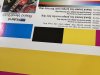
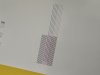

Roland Certified Tech
New Member
Ok. Need to see the service level nozzle test, micro-dot, close up
Jim Hancock
Old School Technician
Please post a pic of the edges of the fill test.
Attachments
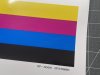


Solventinkjet
DIY Printer Fixing Guide
Have you printed on this material before? To me it looks like the material isn't accepting the ink very well.
I have. I have used a eco solvent iron on transfer material with the same banding issue.Have you printed on this material before? To me it looks like the material isn't accepting the ink very well.
Jim Hancock
Old School Technician
Have you also tested other materials to eliminate the material itself? Sometimes this issues are a bad batch of material.
Jim Hancock
Old School Technician
Heater settings?
Jim Hancock
Old School Technician
Get your dampers from SolventInkJet.com. They sell aftermarket dampers, but this is the ONLY supplier I would buy aftermarket dampers from. They test out their suppliers before deciding to sell a particular item. I've bought dampers from them for many years with no failures. Any other suppliers, such as DigiPrint, you should only go OEM, as their buyers go for the cheapest price on aftermarket parts, which means you cannot rely on the quality of the parts.