• I want to thank all the members that have upgraded your accounts. I truly appreciate your support of the site monetarily. Supporting the site keeps this site up and running as a lot of work daily goes on behind the scenes. Click to Support Signs101 ...

Software Help SP-540V SEH S5-LF recovery/reset procedure

I’m back with a very odd situation. My Roland SP-540v is having technical difficulties again. I set the IP to static, updated the subnet mask and the gateway. Now I can’t get it to open up the admin browser page again and can’t set it up to talk to versaworks nor is it picked up by intercon.

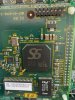
Are there any techs in here with a reset/recovery procedure for the SEH S5-LF server? Here is a picture of the server chip on the network board. Ping/mDNS works, all TCP services are refused.

212B863B-7F77-4A05-AC09-46BB0F58BDFD.jpeg
 

damonCA21

Active Member
There are no recovery procedures. It is most likely the network board has failed if you can ping the board but not set anything up on there
 
There are no recovery procedures. It is most likely the network board has failed if you can ping the board but not set anything up on there
Ya when I changed the IP address, it got hung up on resetting the server. It hasn’t come back since and I accidentally closed the browser a few hrs later. When I try to access it with the new ip address, nothing, page just says failed to load. Stinks I had the whole machine working awesome until this point! I shouldn’t have touched it. Just threw $3k at this machine. It’s like a damn Audi!
 
Does anyone have a known-good used 22805353 / 1000015222 board for sale, or know which donor models interchange with the SP-540V?
Also, is the 3.1 hardware revision corresponding with newer Rolland assembly numbers such as,
1000015222? If I have to order one, I want to make sure I order the correct one.
 
Last edited:

netsol

Premium Subscriber
There are no recovery procedures. It is most likely the network board has failed if you can ping the board but not set anything up on there
DamonCA21 what port is used for the server?
he out to be able to attempt to telnet in and see if he can display a corrupted ip address or subnet

IT MIGHT be possible to avoid replacing the board.
 

netsol

Premium Subscriber
before i bought a new board i would power everything down, UNPLUG POWER
WAIT AN HOUR
then i would remove the button battery and insert it upside down (we have done this with pc's since the early 1990's, and on many other pieces of equipment, but, never with this particular model)
this would almost certainly clear any corrupt data,
not sure if we would need to enter values for the width of the machine, ink type, etc OR if there is a lockout of device setup
 
  • Agree
Reactions: 1 user

damonCA21

Active Member
The network board is only use on a few models, the SP540V, FJ, SJ and AJ. All of these are old printers now.
I do have one tested working board in stock from an SP540V. The revision number doesn't matter as they all operate the same, it referred to small changes in the board design, not the actual software
 
  • Agree
Reactions: 1 users
DamonCA21 what port is used for the server?
he out to be able to attempt to telnet in and see if he can display a corrupted ip address or subnet

IT MIGHT be possible to avoid replacing the board.
I tried telnet as an option. I also ran tcp/ip ping for all ports up to and including 1024. I also tried a few coming ones beyond that. All fail. I can press the blue button on the side of the machine and get into reset mode for the network on the machine. However, I can’t find any documentation on what to do when the yellow light is blinking. It appears to be waiting for a response of input of some kind.
 
  • Agree
Reactions: 1 user

damonCA21

Active Member
Are you connecting direct to the printer, or via a router? It often works better to connect a PC or laptop directly to the printer as a dedicated machine to run it with no other network things on there ( any old PC or laptop is fine, it doesnt need much resources ) . Other things on a network can often cause problems. It does sound more like a board failure though at this point
 
The network board is only use on a few models, the SP540V, FJ, SJ and AJ. All of these are old printers now.
I do have one tested working board in stock from an SP540V. The revision number doesn't matter as they all operate the same, it referred to small changes in the board design, not the actual software
Yes! How much for the board including overnight shipping?

As for what you said netsol , I have unplugged the machine overnight last night and nothing good came of it this morning. Not sure I’m comfortable with flipping the battery upside down. Don’t want to affect anything on the main board and dig myself a deeper hole. If we knew the result for sure, I would attempt it.
 
Are you connecting direct to the printer, or via a router? It often works better to connect a PC or laptop directly to the printer as a dedicated machine to run it with no other network things on there ( any old PC or laptop is fine, it doesnt need much resources ) . Other things on a network can often cause problems. It does sound more like a board failure though at this point
Ya I tried both directly connecting and wireless through my wireless router. I have two laptops, one new MacBook Pro with parallels windows 11 and a windows 10 razer 17 pro laptop. None of them can connect, telnet, or intelcon into the board.
 
  • Agree
Reactions: 1 user

damonCA21

Active Member
Yes! How much for the board including overnight shipping?

As for what you said netsol , I have unplugged the machine overnight last night and nothing good came of it this morning. Not sure I’m comfortable with flipping the battery upside down. Don’t want to affect anything on the main board and dig myself a deeper hole. If we knew the result for sure, I would attempt it.
I will DM you now
 

netsol

Premium Subscriber
unplugging for an hour does nothing except keep you from doing further damage
REMOVING THE CMOS BATTERY AFTER THAT & LETTING IT SIT FOR A FEW HOURS will clear settings (including values that might be corrupted & might be causing your problem. inserting the battery upside down will certainly clear the settings but i am unfamiliar with your model so do not want to do any harm

if you would like to post the ip, gateway and subnet of your pc & the printer, we can troubleshoot a bit further
i would suggest you download advanced ip scanner and run a scan to see if the printer is visible.

FIRST THINGS FIRST post the ip, subnet and gateway of both devices

WAS YOUR IP SET STATIC BEFORE THIS PROBLEM OR WAS IT THE 'TRIGGER EVENT' THAT STARTED THE WHOLE THING?
 
  • Agree
Reactions: 1 user
The printer is still visible when connected to my wireless router and via direct ethernet connection to either laptop. I had no issues with the network until I updated the ip address to a static ip, subnet, and gateway. This issue occurred after I clicked save on the SEH server configuration web interface. The configuration page then stayed on reseting printer server. Then in my troubleshooting and research, I accidentally closed the configuration page and now I'm here. I don't exactly feel comfortable sharing my networking information. I do appreciate your offer. I'm sure you're truly a decent person but, I'm sure you understand.

I did try access via using its identifying name and new static ip address. For Example: http://IC*****D.local:80 and http://new static ip:80 while both plugged into the laptop and connected via wireless router. I ran an extensive TCP port scan. A few keynotes from my extensive testing:
  • The Ethernet hardware works.
  • The printer is reachable.
  • Bonjour works.
  • The hostname resolves correctly.
  • The printer identifies itself correctly.
  • The MAC address did change as I have the original one and the new one documented to compare them.
  • My printer server is advertising all of these services:
    • _printer._tcp
    • _http._tcp
    • _ipp._tcp
    • _pdl-datastream._tcp
  • That means the SEH module believes it is providing:
    • a web server,
    • IPP printing,
    • LPD printing,
    • RAW printing.
So I still have a hunch it's not dead, it's there just on another port or I'm missing something when trying to find it and connect. I'm going to keep the network board when the new one arrives for further testing. If I discover a solution or if someone else does, I'll be able to document it and maybe help someone else later on. I'm wondering if I missed trying to connect a certain way and that's the possible solution? Not sure, it could be that I forgot I need to try plugging in and entering http://192.168.x.xx:80 or http://192.168.x.xx:515 or something stupid like that. I had been at it for the past 2 days straight with little rest. So that's possible.

 

netsol

Premium Subscriber
OBVIOUSLY the server stopped responding. The printer only has one IP address & you have to reconnect with a new ip.

not knowing any of the values (original & revised) I CAN’T tell you how to reconnect.
 
Here are the values:
PC
IP: 192.168.12.xxx
Mask: 255.255.255.0
Gateway: 192.168.12.1


Printer
Original: 169.254.71.181
Changed to: 192.168.12.50
Mask: 255.255.255.0
Gateway: 192.168.12.1

I have verified that I’m communicating with the new IP. It responds to ICMP, Bonjour resolves the hostname to that address, and every advertised TCP service (80, 515, 631, and 9100) returns an immediate TCP connection refused rather than timing out.
 

BOTEC

New Member
Roland PrintServer Network Soft, and Settings Guide
And the process (sory i have it only in French)
I have translat it years ago and do not find the English version
 

Attachments

  • Roland PrintServer Network Settings Guide.pdf
    247.3 KB · Views: 3
  • print_server_nettool_1.8.exe.zip
    4.6 MB · Views: 2
  • SP540V - Initialisation carte Ethernet.pdf
    220.1 KB · Views: 3
  • I Appreciate You
Reactions: 1 user
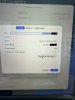
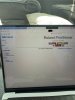
Fixed it!! Thank you BOTEC! Followed the blue button procedure, then followed my hunch, went into add printer on my MacBook Pro M5 with Ethernet connected via usb belkin adapter, clicked on printer settings and options clicked on show printer web page and voila!!! Haha I think I’ll have a drink on this one
 
Fixed it!! Thank you BOTEC! Followed the blue button procedure, then followed my hunch, went into add printer on my MacBook Pro M5 with Ethernet connected via usb belkin adapter, clicked on printer settings and options clicked on show printer web page and voila!!! Haha I think I’ll have a drink on this one
C20FFCE6-1E45-4A5C-88CE-A358ABAF83A2.jpeg 8A9667A4-7EBD-4EC1-B9BB-7D4A511CD833.jpeg
 
  • Agree
Reactions: 1 user
Top