Not sure that you can create new Spot colors in Composer, since it considers those as foils.
The other issue with that method, is that when exporting to EPS/PDF out of Composer, it converts appears to convert all values to RGB, losing all Spot color properties.
I (and by I, I mean ChatGPT) was able to write an Adobe Acrobat "Fixup" that will replace any specific RGB value, and convert it to a spot color named "Spot1". I tested the workflow and after a few tweaks was able to get it to flow smoothly from Composer to Onyx, and it will recognize it as "Spot1" aka white ink.
Doesn't look like I can attach it here, but I can always send it to you if you'd like. Alternatively, if you'd like to create it yourself:
Open Adobe Acrobat.
1. Open Preflight
Tools → Print Production → Preflight
2. Go to Fixups
Click the
wrench icon
Search:
“Convert color”
3. Click:
Create New Fixup
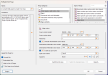
From there, settings should be adjusted to look like below:
View attachment 181635
Click OK.
**These specific RGB values that it's going to look for are just based on my random color test.
In Composer, I assigned a random CMYK value to an object that we'll pretend we want to print with white ink, in this case it was 100/0/100/0, which converts to
R:1 G:147 B:69
View attachment 181639
**You can make this any color you want, you'll just have to verify what it converts to in RGB so that you use those values in your fixup**
Export your file (Using 100/0/100/0 for any objects you want to print white in Onyx) as a PDF, then open in Acrobat.
Run your fixup by going to:
Print Production
Preflight
Click on the Wrench icon
Find your Fixup (Convert RGB green to Spot1 for Onyx)
Click "Fix" in bottom right
It should analyze your file and convert your colors to Spot1.
I've set it to change to purple so it's obvious when it works, but you can set it to anything you like.
If you want to double-check that it worked before going to Onyx, you can do the following:
Print Production
Convert Colors
Click the little arrow on top right
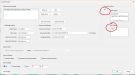
You should see "Spot1" listed under Spot Colors now
View attachment 181638
Hope that all makes sense! It probably doesn't as I've only had one coffee, so let me know if you need any clarification.
There are probably other ways to achieve this but this was the only method I was able to get to work, with my limited knowledge of Acrobat preflight.