Tenacity Graphics
New Member
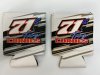
I bought a Surecolor f170 a few months ago just so I could offer koozies to my race car customers. I’ll start by saying I found out I was printing on the wrong side of the transfer paper and the quality of the prints were kind of blurry but colors were always pretty close. Once I figured out about my paper issue my print quality improved drastically in print/color quality. My new issue is my greys are printing out brown now. Im using a Mac and printing from illustrator also tried from my PC same issue. I can select the correct color profile for textiles it seems but I’m not sure if there is something else I’m missing? I downloaded a grey color swatch with about 100 different greys and they all come out brown/tan. Any thoughts on what I’m doing wrong?