
Run a small print shop. Maybe 1 in 5 files come in actually ready for press. Today's was a tri-fold brochure — figured I'd share since I know others deal with this too.
File came in: a PDF the customer generated from Canva. 2 pages, 11 × 8.5 in flat. "It's print-ready."
Opened it up. TrimBox and BleedBox were identical — no bleed anywhere. Both pages had low-res images (129 dpi on one side, 176 dpi on the other). Color was a mix of RGB and CMYK.
What I did:
1. Preflight — logged every issue. No bleed, low-res images, mixed color spaces. Didn't touch the images or colors — just noted them.
2. Added bleed — mirrored the edges out to 0.125 in. Original content inside the trim area stayed exactly where it was.
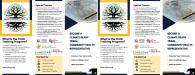
Here's the before/after with trim and bleed lines overlaid (red = trim, blue = bleed):

3. Panel layout check — since it's a tri-fold, I mapped out the fold lines and panel boundaries to make sure no text was falling into the fold zone.
4. Pixel-level diff — compared the original content area against my output. Result: 0.00% difference. Nothing moved, scaled, or clipped inside the trim area.
End-to-end: about 25 minutes. Customer gets a file that actually works on press, a proof they can approve, and a list of things that didn't get fixed (those low-res images, the mixed color spaces).
(Customer info anonymized — but the file is real.)
I charge for fix time rather than eating it. But I know every shop handles this differently. A couple things I'm curious about from folks here:
- For tri-folds specifically — do you handle the imposition in-house or leave that to the customer?
- At what DPI do you flag an image as "not my problem unless you want me to redraw it"?
File came in: a PDF the customer generated from Canva. 2 pages, 11 × 8.5 in flat. "It's print-ready."
Opened it up. TrimBox and BleedBox were identical — no bleed anywhere. Both pages had low-res images (129 dpi on one side, 176 dpi on the other). Color was a mix of RGB and CMYK.
What I did:
1. Preflight — logged every issue. No bleed, low-res images, mixed color spaces. Didn't touch the images or colors — just noted them.
2. Added bleed — mirrored the edges out to 0.125 in. Original content inside the trim area stayed exactly where it was.
Here's the before/after with trim and bleed lines overlaid (red = trim, blue = bleed):
3. Panel layout check — since it's a tri-fold, I mapped out the fold lines and panel boundaries to make sure no text was falling into the fold zone.
4. Pixel-level diff — compared the original content area against my output. Result: 0.00% difference. Nothing moved, scaled, or clipped inside the trim area.
End-to-end: about 25 minutes. Customer gets a file that actually works on press, a proof they can approve, and a list of things that didn't get fixed (those low-res images, the mixed color spaces).
(Customer info anonymized — but the file is real.)
I charge for fix time rather than eating it. But I know every shop handles this differently. A couple things I'm curious about from folks here:
- For tri-folds specifically — do you handle the imposition in-house or leave that to the customer?
- At what DPI do you flag an image as "not my problem unless you want me to redraw it"?

