
-
I want to thank all the members that have upgraded your accounts. I truly appreciate your support of the site monetarily. Supporting the site keeps this site up and running as a lot of work daily goes on behind the scenes. Click to Support Signs101 ...
You are using an out of date browser. It may not display this or other websites correctly.
You should upgrade or use an alternative browser.
You should upgrade or use an alternative browser.
Aptos font is bad!
- Thread starter myront
- Start date




The Vector Doctor
Chief Bezier Manipulator
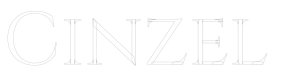
many of the fonts available on google fonts are this way. you must convert your fonts to curves/shapes and then look at them in outline mode. i see this daily. Make sure you weld all the shapes. If you were to cut vinyl then yes the plotter will follow all of those paths. There are other font co's that are doing the same. Aptos is one of them from Microsoft. i have seen others. This is Cinzel which is full of those extra paths
Attachments
Last edited:
The Vector Doctor
Chief Bezier Manipulator
Fonts that have letters with overlapping shapes is not exactly a new thing. Since the introduction of OpenType Variable fonts the overlaps have become increasingly common. And they're not just in variable fonts either. Plenty of "static" fonts have them too, but those fonts are often frozen instances extracted from variable fonts.
The overlaps also provide a hint on how type families with many styles are constructed. The letters will have a certain number of master styles along a variable axis and all the in-between instances are a result of a blend between masters styles. The overlaps render on screen as being solid because of a non-zero winding rule coded into the fonts (the even/odd rule results in holes appearing where overlaps occur). The Type 1 Multiple Master font format used this concept. Even though the type format died many type designers continued creating large super families of fonts using multiple master techniques (and a good amount of scripting) rather than manually draw every style.
The letters overlaps are easy enough to eliminate in apps like CorelDRAW and Adobe Illustrator. The trick is noticing the overlaps in the first place. One complaint I have about Illustrator is live text objects are rendered solid black in Outline View rather than outlines. In Illustrator you have to convert a type object to outlines in order to see if it has any overlaps in the letter shapes. In CorelDRAW live text objects are shown as outlines in Wireframe View.
I've always checked the outline view of artwork before sending anything into production. There are plenty of other things besides overlaps in variable font letters that can cause big problems in a vinyl cutter or routing table. Customer provided artwork in PDF format is particularly prone to hazards -such as things like invisible duplicate paths that occur from multiple clipping paths and clipping groups being created when the PDF was generated. The Vector First Aid plugin for Illustrator is really good at detecting those things and other problems.
The overlaps also provide a hint on how type families with many styles are constructed. The letters will have a certain number of master styles along a variable axis and all the in-between instances are a result of a blend between masters styles. The overlaps render on screen as being solid because of a non-zero winding rule coded into the fonts (the even/odd rule results in holes appearing where overlaps occur). The Type 1 Multiple Master font format used this concept. Even though the type format died many type designers continued creating large super families of fonts using multiple master techniques (and a good amount of scripting) rather than manually draw every style.
The letters overlaps are easy enough to eliminate in apps like CorelDRAW and Adobe Illustrator. The trick is noticing the overlaps in the first place. One complaint I have about Illustrator is live text objects are rendered solid black in Outline View rather than outlines. In Illustrator you have to convert a type object to outlines in order to see if it has any overlaps in the letter shapes. In CorelDRAW live text objects are shown as outlines in Wireframe View.
I've always checked the outline view of artwork before sending anything into production. There are plenty of other things besides overlaps in variable font letters that can cause big problems in a vinyl cutter or routing table. Customer provided artwork in PDF format is particularly prone to hazards -such as things like invisible duplicate paths that occur from multiple clipping paths and clipping groups being created when the PDF was generated. The Vector First Aid plugin for Illustrator is really good at detecting those things and other problems.
Ronny Axelsson
New Member
These overlaps are common with variable fonts, just as Bobby mentioned, and I wouldn’t be surprised if the different Aptos font weights stem from variations of an original Aptos variable font.
Personally, I think using variable fonts is just asking for trouble.
I always convert fonts to curves before sending to the cutting plotter, or to be more precise, I use the Weld function in Draw to make sure all overlapping curves are merged.
It’s worth noting that some fonts need double welding (or converting to curves first and then welding) to make sure everything comes out correctly.
Personally, I think using variable fonts is just asking for trouble.
I always convert fonts to curves before sending to the cutting plotter, or to be more precise, I use the Weld function in Draw to make sure all overlapping curves are merged.
It’s worth noting that some fonts need double welding (or converting to curves first and then welding) to make sure everything comes out correctly.

chester215
Just call me Chester.
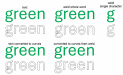
Manrope is that way also.

JBurton
Signtologist
Montserrat is the bane of my existence. The capital R was devised by nazis:

So welding only works with the leg, the outer perimeter and inside are both self intersecting... At least they aren't one line... Here's the exploded parts:
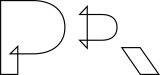
So you have to go in and draw little squares and weld/trim the overlaps, or individually edit the nodes. The kicker is it only does this on my machine, on the sales guy's computer everything comes out as expected. Which is only super annoying when I have to make a small change and don't notice until the engraver has a heart attack.
So welding only works with the leg, the outer perimeter and inside are both self intersecting... At least they aren't one line... Here's the exploded parts:
So you have to go in and draw little squares and weld/trim the overlaps, or individually edit the nodes. The kicker is it only does this on my machine, on the sales guy's computer everything comes out as expected. Which is only super annoying when I have to make a small change and don't notice until the engraver has a heart attack.
The Vector Doctor
Chief Bezier Manipulator
perhaps you need to download a new version? Montserrat has been refined over the years. None of the weights on my machine have this. Perhaps this is why it does not happen on the other guy's computer. You guys are using different versions of the same font.
Attachments

JBurton
Signtologist
Probably, but on the production machine attached to the engraver, where I'd have the issue, we don't have internet connected, so it was either do a handful of changes, or march up stairs, find the file, put it on a flash drive, and go install it. Luckily we no longer have to produce signs for that particular client, we fired ourselves via constantly increasing prices...perhaps you need to download a new version? Montserrat has been refined over the years. None of the weights on my machine have this. Perhaps this is why it does not happen on the other guy's computer. You guys are using different versions of the same font.

Boudica
I'm here for Educational Purposes
Just had this one the other day.... Bahnshrift. Good times. You mangle one (large) cut job with something like this, and never again forget to look at it in outline view before calling it good to go. Fortunately I caught this one... it was a different project that learned me good.

JBurton
Signtologist
Ya know, I was cursing that it wasn't just a cut vinyl job, because at least the plotter software has a setting for nixing the overlaps...You mangle one (large) cut job with something like this
The Vector Doctor
Chief Bezier Manipulator
that's exactly how i build many of the fonts i have to trace. I keep it as a working file but weld everything together when its time to create the customer fileJust had this one the other day.... Bahnshrift. Good times. You mangle one (large) cut job with something like this, and never again forget to look at it in outline view before calling it good to go. Fortunately I caught this one... it was a different project that learned me good.
View attachment 181513
Boudica
I'm here for Educational Purposes
Say, that's not a bad idea! I'll have to try that sometime. And here I've been doing it manually with the pen tool. boxes sound faster.that's exactly how i build many of the fonts i have to trace. I keep it as a working file but weld everything together when its time to create the customer file
Boudica
I'm here for Educational Purposes
I think the first time it bit me in the butt was actually brush script. It was a print cut... didn't even think to look. Now I know better - trust nothing.Ya know, I was cursing that it wasn't just a cut vinyl job, because at least the plotter software has a setting for nixing the overlaps...
Onyx cut server does not allow any manipulation of the cut file... double cuts, cross cuts, stray cuts - you're screwed.

Geneva Olson
Expert Storyteller
looks like you shoulda welded it. we look at everything in wireframe first.

Ron at Forest Litho
New Member
The Vector Doc is right. Converting them to Curves will stop the imperfections and anomalies in a poorly done Font, BUT, Be sure to keep an original type version of the file, And the curves version that you will print. Because if you need to make a type change, it's much easier to do it from actual fonts. For myself I have not had your problem. But I have converted text to curves so that I can physically adjust a certain letter that was not like a clients logo and all the rest were. So it is great to be able to alter the one thing that isn't right.
Ronny Axelsson said:Personally, I think using variable fonts is just asking for trouble.
I love variable fonts and the design flexibility they offer. However, I do tend to convert all the live type objects in my designs to raw outlines (and weld over any overlaps) once a design is final. I design things in such a manner where it's easy for me to replace outlined lettering with live type if I need to do so. I don't randomly eye-ball shit together.
Variable fonts are another reason why I have an intense hatred toward designs where type has been crudely squeezed and stretched out of normal proportions. One common hallmark of really shitty sign designs is the default Arial typeface is used and then squeezed or stretched to fit. LAZY AS HELL!!! There are decent variable fonts that are freely available that can more gracefully fit strings of type into a confined space. But, no. The lazy hacks out there cannot get past the letter "A" in the font menu. Another typeface I cannot stand to see distorted is Gotham. Anyone who thinks Gotham looks okay distorted out of its normal proportions is an idiot.
There are numerous good quality variable fonts that have weight and width axes that take away any excuse for anyone artificially distorting lettering. It's the year 2026 now. It ain't 1993 anymore.
JBurton said:So you have to go in and draw little squares and weld/trim the overlaps, or individually edit the nodes. The kicker is it only does this on my machine, on the sales guy's computer everything comes out as expected. Which is only super annoying when I have to make a small change and don't notice until the engraver has a heart attack.
What application are you using to create/edit the letters? CorelDRAW, Illustrator or something else?
In CorelDRAW, when you first convert a type object to curves it's very import to see if the converted object is turned into a group or not. CorelDRAW will automatically divide raw letter shapes into a series of groups if the paths have too many anchor points. If you try to apply a weld function to a grouped string of letters that have overlapping paths things will get screwed up bad. BUT!!! If you release the group and then apply the weld function to smaller combined sets of letters at a time the overlaps will fill in cleanly. I have the "W" key set at a custom short cut in my CorelDRAW installations just for the sake of filling in overlapped letter shapes.
In Adobe Illustrator the Unite Pathfinder function is pretty good at filling in letter overlaps. But I still keep an eye out for strings of text converted to outlines being turned into a series of grouped objects.
The Vector Doctor said:perhaps you need to download a new version? Montserrat has been refined over the years. None of the weights on my machine have this. Perhaps this is why it does not happen on the other guy's computer. You guys are using different versions of the same font.
The current version of Montserrat available at Google Fonts has overlaps in the glyphs within both the variable and static versions. Quite a few other font packages at Google Fonts have the same thing. Simply put, everyone has to view their artwork in outline view to look out for problems. They need to be doing that anyway.
I try downloading new builds of certain type families hosted at Google Fonts due to other issues. CorelDRAW and its built-in font manager app doesn't get along well with a lot of files from Google Fonts. Sometimes when certain type families are selected and applied to a type object the lettering can turn into default Arial. Or the fonts will preview in the fonts menu looking like Arial. Google does not do a good enough job of quality control on fonts it hosts at its fonts site.
Sometimes Google will take really buggy fonts off their site. For instance, they carry only the static version of the Barlow type family. There is a variable version of it online, but not at Google Fonts. The times I've tried using the variable version in CorelDRAW it has caused CorelDRAW to crash as soon as the font was selected in the menu. Not good.
Last edited:
The Vector Doctor
Chief Bezier Manipulator
Yes i see that now. The most current version of Montserrat is built that way. They do have overlaps. I guess mine is older or the Adobe CC version. Kind of annoying that there are so many versions out there.