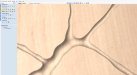
When running 2.5D engraving, I have found that telling the software the stock is slightly thicker than what it is alows the bit to not start or stop on the material. In my experience this has been the main cause of artifacts on the surface of the part. I don't have that software so can't say for sure, but it looks similar to an Artcam rendering or Fusion 360 cam rendering.We did run a full part, and the chatter was there. It was slight and we were able to sand it down, but we would like to know how to make it not be there.
It's basically artcam, except they moved all the useful functions around and really made me hate it. I still have an old copy of artcam I fire up to do such things.Artcam rendering
We imported a vector file out of Illustrator.What type of file did you use to generate the toolpath?
We will try that. Thanks.When running 2.5D engraving, I have found that telling the software the stock is slightly thicker than what it is alows the bit to not start or stop on the material. In my experience this has been the main cause of artifacts on the surface of the part. I don't have that software so can't say for sure, but it looks similar to an Artcam rendering or Fusion 360 cam rendering.
No...it takes longer to router a toolpath with chatter than it does a smooth one....but it'll be a lot more taxing on your computer to make the files as there is more data in the reliefWe just found where the resolution settings are. Thanks for the tip about using the shift + control buttons. If we set it to "50x slower" will it take more time to route on our CNC router?
Okay great! Thanks. We are going to give that a try.No...it takes longer to router a toolpath with chatter than it does a smooth one....but it'll be a lot more taxing on your computer to make the files as there is more data in the relief
If I'm not mistaken, you'll need to increase your resolution by the same factor that you scaled down to achieve a similar result on your production piece. (I could be wrong, I don't use Aspire)We routed a scaled down version of this using 50x resolution this morning. It turned out great. There was no chatter!
I would think that too, but no, it doesn't work like that.If I'm not mistaken, you'll need to increase your resolution by the same factor that you scaled down to achieve a similar result on your production piece. (I could be wrong, I don't use Aspire)
Makes since if it's a value like resolution, what does this value actually represent? Typically I'll see something like accuracy gauged in decimals rather than 20x.the resolution (7x, 20x, 50x)