We have a XC-540 that we go used years ago and it has been a good first printer and have learned a great deal with it. I am having issues with consistency with printing the same color from one print to another. We have been doing more vinyl wraps and color from say the rear section to the side section the color does not match because they didn't get run at the same time. I dont think I could print the same color and have it match two times in a row. Same file, same material, same everything. We are in a climate controlled shop and the temp and humidity are controlled as best they can be with heat and air conditioning. The printer is also profiled with an I1pro. All the head are relatively new and the test print is always good. Any suggestions on fixing this or is this just becoming the end of the line for this printer?

-
I want to thank all the members that have upgraded your accounts. I truly appreciate your support of the site monetarily. Supporting the site keeps this site up and running as a lot of work daily goes on behind the scenes. Click to Support Signs101 ...
You are using an out of date browser. It may not display this or other websites correctly.
You should upgrade or use an alternative browser.
You should upgrade or use an alternative browser.
Color is never the same from one print to another. XC-540 CMYKlclm
- Thread starter Jharris81
- Start date
Roland Certified Tech
New Member
So are you saying when you do a print, the left side of the print does not match the right side when printed? The printer will not print the same on the left and the right hand side of the printer. If you are doing tiling, you need to make sure you hit the checkmark. Place alternated.
this will print each of the sections on the proper side of the printer so they align when you’re putting them together
this will print each of the sections on the proper side of the printer so they align when you’re putting them together
Well that has been an issue as well but I’m saying that if I print the same thing twice, the color will not be the same. If I were to print a panel for a wrap, then print it again without changing anything the color will not match. Depending in the color, the severity of it will differ.

Ron at Forest Litho
New Member
IF you print the same thing twice in a row and he color is diff then it has to be the ink feed/flow on at least one of the inks.

Think713
New Member
the xc540 in itself is already an old printer. Its probably as mentioned above something going on with the lines, or maybe you have a dying printhead.We have a XC-540 that we go used years ago and it has been a good first printer and have learned a great deal with it. I am having issues with consistency with printing the same color from one print to another. We have been doing more vinyl wraps and color from say the rear section to the side section the color does not match because they didn't get run at the same time. I dont think I could print the same color and have it match two times in a row. Same file, same material, same everything. We are in a climate controlled shop and the temp and humidity are controlled as best they can be with heat and air conditioning. The printer is also profiled with an I1pro. All the head are relatively new and the test print is always good. Any suggestions on fixing this or is this just becoming the end of the line for this printer?
Edit** I say old cause I worked on one almost 11 years ago, but i see they'e actually made newer models of them.
i just replaced my sc545ex (20 year old printer)
properly maintained colors were rock solid, no inconsistency in color from print to print
change cap tops, dampers, ORINGS, give it a good going over shake the inks weekly
there is no reason for that kind of problem on reprints
properly maintained colors were rock solid, no inconsistency in color from print to print
change cap tops, dampers, ORINGS, give it a good going over shake the inks weekly
there is no reason for that kind of problem on reprints
Roland Certified Tech
New Member
Yes, maybe try head wash

Foremander
New Member
I had the exact same problem on an old roland pro II 12 years ago, never could find the problemWell that has been an issue as well but I’m saying that if I print the same thing twice, the color will not be the same. If I were to print a panel for a wrap, then print it again without changing anything the color will not match. Depending in the color, the severity of it will differ.
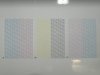
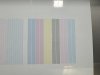
Do nozzle checks and cleaning before printing. Do you do manual cleanings. Clean/Replace wipers and felts? There is also a scraper below the wipers/felts.We have a XC-540 that we go used years ago and it has been a good first printer and have learned a great deal with it. I am having issues with consistency with printing the same color from one print to another. We have been doing more vinyl wraps and color from say the rear section to the side section the color does not match because they didn't get run at the same time. I dont think I could print the same color and have it match two times in a row. Same file, same material, same everything. We are in a climate controlled shop and the temp and humidity are controlled as best they can be with heat and air conditioning. The printer is also profiled with an I1pro. All the head are relatively new and the test print is always good. Any suggestions on fixing this or is this just becoming the end of the line for this printer?

Yes, I run nozzles check and I do a manual cleaning once a week. Replace parts when needed. Kinda go off the nozzle check to make sure nothing is wrong. I treat this printed with the best care i can.Do nozzle checks and cleaning before printing. Do you do manual cleanings. Clean/Replace wipers and felts? There is also a scraper below the wipers/felts.
Can you do a row of the Roland test prints? If this pic is representative you seem to have something going on. Are you familiar with the encoder strip? Also could do test print with bi-direction on/off.So here is a sample I just printed. One right after the other. Didn’t change anything. Just printed it. And I know greys are very hard to get right but should still be consistent I’d think.
Attachments

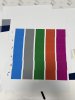
I use versaworks 5.5. I just use one computer to print everything.Do you use Versaworks? Multiple computers that you print from?
Foremander
New Member
Whatever it is, it's happening between jobs, not during one,, five strips in a row coming out perfect kind of proves that.
I'd look at the light inks. They settle worse than anything and a lazy Lc or Lm will pull everything warm without ever showing up on a nozzle check, so "test print looks fine" doesn't really tell you much there. Head temp is worth a thought too, first print of the day off cold heads never quite matches one you pull two hours into a run
I'd look at the light inks. They settle worse than anything and a lazy Lc or Lm will pull everything warm without ever showing up on a nozzle check, so "test print looks fine" doesn't really tell you much there. Head temp is worth a thought too, first print of the day off cold heads never quite matches one you pull two hours into a run
Jim Hancock
Old School Technician
I would suggest you run the fill test under test pattern in the print menu in service mode. If you aren't familiar with it, it prints each head individually at 720x720, 8 pass, bi-dir, 100% ink. No profiles or images, just each head running full blast at pure ink color. Watch it constantly while it prints and shine a bright light on it while you do. You could run it, wait a bit and run again, or run it multiple time in a row. Since you have an i1pro, you can also take spot measurements and see if you find any inconsistencies in density. I would also suggest you use your i1pro for troubleshooting this issue. Measure the same exact areas on the prints that have the color deviations and you should be able to see what colors are changing. Think of it like a multimeter for color...