The posters printer is an RS not a VPIf G-ENC is always 0 in all tests, even after replacing the encoder disk and sensor and confirming the wiring is good, then it’s about 90% likely not the feed motor or the sensor. It usually points to a problem on the Feed Motor Board or Servo Board where the G-ENC signal is read.
If G-ENC never changes, it means the grit encoder signal is simply not being seen by the system.
The encoder uses an IR LED, which is naturally very dim to the eye. Ambient light doesn’t matter.dark or bright makes no difference.
Broken wires or bad connectors have already been ruled out, which pushes the problem back to the board.
On a normal VP-540, the feed motor aging test should run forward, stop, reverse, and repeat.
If it only runs forward every 5 seconds and never reverses, the controller knows it’s missing a key feedback signal and falls back to basic one-direction drive instead of closed-loop control.
That points to a failed G-ENC input circuit on the Feed Motor Board (optocoupler / counter / input stage).
The practical fix is replacing the Feed Motor Board.

-
I want to thank all the members that have upgraded your accounts. I truly appreciate your support of the site monetarily. Supporting the site keeps this site up and running as a lot of work daily goes on behind the scenes. Click to Support Signs101 ...
You are using an out of date browser. It may not display this or other websites correctly.
You should upgrade or use an alternative browser.
You should upgrade or use an alternative browser.
HELP!! VP540 Advancing while printing like crazy!
- Thread starter yukon
- Start date
Jim Hancock
Old School Technician
Oops! However, the feed motor circuitry on the feed motor board show the same straight pass-through for the feed motor circuitry on both printers.
Yeah at that age the heads are pretty well spent.Totally understand your thought process on this. I'm retiring after 35 years of this and equipment is not worth anything for resale, and would still like a working printer for personal use (we have pictures all over the house and other peoples houses). Still have 2 vinyl cutters, seal 600c laminator, seal EP42 thermal laminator, CNC machine... All things I still use that don't have enough resale value to sell. If I could pick up a used Roland 54" machine for 3k-4k that didn't need new print heads I would and sell my RS-640 for parts.
Last edited:
It's a good idea to work through the signal paths methodically like this yo rule out any bad connectionsI can check continuity from the grit encoder disk sensor connector to the end of the ribbon cable at the servo board first to rule out everything before the servo board. If no continuity work backwards. That way I can leave the board in place.
Feed motor board is not getting signal from green wire from grit encoder board (#5 wire on connector - Grit encoder phase B) to pin 13 on ribbon cable connector on feed motor board, Blue wire (#3 wire on connector - Grit encoder phase A) to pin 15 has continuity so feed motor board trace is broken somewhere for phase A. Need new feed motor board, does that sound right?
Anyone know of a good place to get one? Amazon? ( https://www.amazon.com/ROLAND-RS-64...roland+rs-640+feed+motor+board,aps,239&sr=8-1 )
Jim Hancock
Old School Technician
A technically correct repair in this situation would be to simply solder a jumper wire from the pin 5 on CN413 to pin 13 on CN412, in effect, bridging the trace break. A good electronics repair shop should do it for an inexpensive fee.

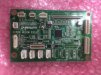
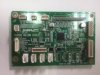
I should have the oem.ones in stock, I will check in a bit. Or i can do the repair for you if you dont have someone local who can do it. As Jim says that would be a cheaper way of doing itAnyone know of a good place to get one? Amazon? ( https://www.amazon.com/ROLAND-RS-640-VP-300-VP-540-Printer/dp/B079L6Z6M8/ref=sr_1_1?crid=H1TWKL824EFH&dib=eyJ2IjoiMSJ9.n7e3G8pNTWYnfeaJ3acv7P9VPrsphXer59ws6gokbnPFTEhMmiCD1gKMHaeh-bwZj118xrlOX6l62eOIfI57RK8SoXcgn3j83m-MfZkyW50IOVWQpBDpAUD_v2S0iflY.iAW4SJv9C-8cJRFFfifUDyI3OFc7O099LglCCTdENEg&dib_tag=se&keywords=Roland+rs-640+feed+motor+board&qid=1767843123&sprefix=roland+rs-640+feed+motor+board,aps,239&sr=8-1 )
And well done for finding the problem. At least we are getting closer now!Feed motor board is not getting signal from green wire from grit encoder board (#5 wire on connector - Grit encoder phase B) to pin 13 on ribbon cable connector on feed motor board, Blue wire (#3 wire on connector - Grit encoder phase A) to pin 15 has continuity so feed motor board trace is broken somewhere for phase A. Need new feed motor board, does that sound right?