• I want to thank all the members that have upgraded your accounts. I truly appreciate your support of the site monetarily. Supporting the site keeps this site up and running as a lot of work daily goes on behind the scenes. Click to Support Signs101 ...

I am utterly ashamed I have been unable to figure this out!

jdwilliams1

New Member
Going on over 2 years trying to learn the rolled printing and lamination business. Have been flatbed printing for 2 decades and trying to marry up design, to print, to lamination so i can print and cut great quality stickers has proven to be impossible. I try and lose patience then walk away for a few weeks and then try again and so on. I bought this all from Lexjet with whom I will never be doing business with them again. I get many of you have had great experiences, but I am not one of those who had. I digress.
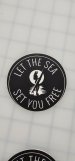
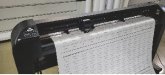
I am attaching photos of my latest issue. I should say as of right now I can print and cut vinyl almost perfectly both kiss and die cut. But when I begin to try lamination that is where the wheels come off. I should say I have an Epson Surecolor S80600L, Summa s2 160, and a GFP 563TH Lam. I am only doing short runs as to try and get things dialed in so I have yet to have a full roll of anything printer, laminated or cet up on the cutter. Usually only about 3- 5 ft of material in hopes i can get things dialed in.
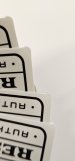
I am contantly getting ineven borders and also cuts are off so it seems. Would love some feedback or at some point I will just need to have someone come on stie for some serious training. Thanks for your help
 

Attachments

  • 20260317_143519.jpg
    20260317_143519.jpg
    800.5 KB · Views: 177
  • 20260317_143039.jpg
    20260317_143039.jpg
    816.9 KB · Views: 152
  • 20260317_143544.jpg
    20260317_143544.jpg
    870.5 KB · Views: 146
  • 20260313_085108.jpg
    20260313_085108.jpg
    518.6 KB · Views: 160

dannyd1962

Remote Freelancer
Load up every row of printing with register marks, the more there is the better the cuts will line up to the print.
 
  • Agree
Reactions: 1 users

dannyd1962

Remote Freelancer
Check your rip software on the printer. There should be options in there to add, or at least to break your row / columns into smaller sections...Which in turn give you more registration marks to help.
 

JBurton

Signtologist
What rip are you using?
Personally, I hate the way onyx 12-18 handled registration marks, so I brute forced it with corel generating the marks for a graphtec.

Also, I think the cuts not lining up start to finish is a mechanical issue or a setting for the type of blade, but I've never touched a summa, so someone else should have good thoughts there.
 
  • Agree
Reactions: 1 user

Snydo

New Member
One thing worth trying is to move your left most pinch roller inside of the left most registration mark, the closer the pinch rollers are together the more stability the media has while feeding back and forth. The right pinch roller has to be outside reg mark.
You can also try using narrower media, which again will make the media more stable as it feeds back and forth.
Your choice of media can make a huge difference also, the backer/liner quality and thickness can greatly improve accuracy. Die cutting is no joke and can take serious dedication to master.
 
  • Agree
Reactions: 1 users

unclebun

Active Member
Most of those pictures show a problem with the cutter itself. It's not meeting the origin point with its finish point. Have you set up the plotter, i.e. blade offset, media compensation, and so on?

Some of those settings will also correct the incorrect placement of the cut on the print as well.

Finally, I would start out with trying to get perfect kiss cuts before you mess with having it cut all the way through the paper. I find that to be an activity fraught with problems on a roll plotter. We prefer to kiss cut, weed, then cut the decals apart.
 
  • Agree
Reactions: 3 users

jdwilliams1

New Member
Check your rip software on the printer. There should be options in there to add, or at least to break your row / columns into smaller sections...Which in turn give you more registration marks to help.
Thanks Danny I will look into that we use Onyx for this printer.
 

jdwilliams1

New Member
What rip are you using?
Personally, I hate the way onyx 12-18 handled registration marks, so I brute forced it with corel generating the marks for a graphtec.

Also, I think the cuts not lining up start to finish is a mechanical issue or a setting for the type of blade, but I've never touched a summa, so someone else should have good thoughts there.
Jburton we use onyx and it has quite the learning curve for me. Thanks for the input, what is weird about the cuts not lining up many other stickers on the same job cut perfectly, so many are perfect and some are very bad.
 

jdwilliams1

New Member
One thing worth trying is to move your left most pinch roller inside of the left most registration mark, the closer the pinch rollers are together the more stability the media has while feeding back and forth. The right pinch roller has to be outside reg mark.
You can also try using narrower media, which again will make the media more stable as it feeds back and forth.
Your choice of media can make a huge difference also, the backer/liner quality and thickness can greatly improve accuracy. Die cutting is no joke and can take serious dedication to master.
I will try the pinch roller idea, I was not awareit would cut outside the last pinch roller. I have basically been working with the same media since the beginning we use the grimco briteline. i am open to any thoughts on the best yet affrodable vinyl and laminate for stickers
 

jdwilliams1

New Member
Most of those pictures show a problem with the cutter itself. It's not meeting the origin point with its finish point. Have you set up the plotter, i.e. blade offset, media compensation, and so on?

Some of those settings will also correct the incorrect placement of the cut on the print as well.

Finally, I would start out with trying to get perfect kiss cuts before you mess with having it cut all the way through the paper. I find that to be an activity fraught with problems on a roll plotter. We prefer to kiss cut, weed, then cut the decals apart.
unclebun, should mention many of the stickers on the same job are perfect and a few are not. This makes me feel like the vinyl is not laying flat all across the cut line maybe? I should say kiss cut is very good so i have moved onto the flex cut
 

netsol

Premium Subscriber
Joseph Gerber had it right with pin feed. 150' and perfectly aligned
other than that beyond 8 ft
Abandon hope all Ye who enter here
dante-inferno.png
 
  • Agree
Reactions: 2 users
unclebun, should mention many of the stickers on the same job are perfect and a few are not. This makes me feel like the vinyl is not laying flat all across the cut line maybe? I should say kiss cut is very good so i have moved onto the flex cut
Keep in mind that the flex cut is effectively (mostly) cutting holes in the larger sheet of media. This can affect the stability of the media sheet in real time, so some flex cuts are likely to be more accurate (the ones that cut first) or less accurate (the later flex cuts) due to stability of the media at the time of the flex cut. That is likely why kiss cuts are fine (they cut first) and some flex cuts are not closing properly.
 
  • Agree
Reactions: 2 users

Daniel OTW

New Member
I was not aware you could add registration marks
If you don't already know, reg marks are arbitrary, while it may easier they don't need to be software generated. If you're manually plotting out a gang sheet of randoms, just draw in .25 circles in multiple places throughout your negative space and assign them at the cutter and your cuts should come out way more accurate. When I first started I was under the impression that reg marks were some kind of unique thing separate from the artwork, they are not.
 
  • Agree
Reactions: 1 user

gabagoo

New Member
One thing worth trying is to move your left most pinch roller inside of the left most registration mark, the closer the pinch rollers are together the more stability the media has while feeding back and forth. The right pinch roller has to be outside reg mark.
You can also try using narrower media, which again will make the media more stable as it feeds back and forth.
Your choice of media can make a huge difference also, the backer/liner quality and thickness can greatly improve accuracy. Die cutting is no joke and can take serious dedication to master.
So you are saying you don't have to have the left pinch roller past the reg mark? How is this possible unless it is not a Summa thing but a Rip thing. I use Flexi and from what I have experienced is that the left and the right have to be outside the rollers. Is there a way you can fake them out?
 

netsol

Premium Subscriber
So you are saying you don't have to have the left pinch roller past the reg mark? How is this possible unless it is not a Summa thing but a Rip thing. I use Flexi and from what I have experienced is that the left and the right have to be outside the rollers. Is there a way you can fake them out?
that doesn't make sense to me either.
we are a flexi shop primarily, as well, though
 

cwstevens

New Member
30+ year Flexi user here. You absolutely should be able to register print to cut, whether between two different machines (printer / plotter) or all from print device.
Just can't vouch for anything on your machines mentioned. it's all in the software for the most part, but you do have to work the machine settings, media, laminate etc. all factor in.
 
  • Agree
Reactions: 1 user

Snydo

New Member
So you are saying you don't have to have the left pinch roller past the reg mark? How is this possible unless it is not a Summa thing but a Rip thing. I use Flexi and from what I have experienced is that the left and the right have to be outside the rollers. Is there a way you can fake them out?
I am using Flexi for set-up, Onyx for a RIP, and Summa Cutter Control with barcodes for cutting.
The right side definitely has to be outside the crop, the left side can be inside, and this technique massively improves accuracy with less expensive materials with cheap thin liners.
summa left.jpg
 
Last edited:
  • Agree
Reactions: 4 users

jdwilliams1

New Member
So you are saying you don't have to have the left pinch roller past the reg mark? How is this possible unless it is not a Summa thing but a Rip thing. I use Flexi and from what I have experienced is that the left and the right have to be outside the rollers. Is there a way you can fake them out?
No I am sorry, I thought someone mentioned the left roller could be moved inside the registration mark on the left, sorry about that is I misled you. I was thinking the same as you when I read it.
 

jdwilliams1

New Member
If you don't already know, reg marks are arbitrary, while it may easier they don't need to be software generated. If you're manually plotting out a gang sheet of randoms, just draw in .25 circles in multiple places throughout your negative space and assign them at the cutter and your cuts should come out way more accurate. When I first started I was under the impression that reg marks were some kind of unique thing separate from the artwork, they are not.
Daniel, I am not sure how we accomplish making registration marks throughout the layout.
 
Top