• I want to thank all the members that have upgraded your accounts. I truly appreciate your support of the site monetarily. Supporting the site keeps this site up and running as a lot of work daily goes on behind the scenes. Click to Support Signs101 ...

Discussion I've owned an HP R1000 since April 2019, ask me anything

balstestrat

Problem Solver
thank you we have cycled the printer several times but no joy... so frustrating, its definitely to do with the second ethernet card which connects to the printer and its lost its IP address so wont connect.
You can set the IP again if that's the case. 172.22.22.21
 

mbasch

New Member
thank you we have cycled the printer several times but no joy... so frustrating, its definitely to do with the second ethernet card which connects to the printer and its lost its IP address so wont connect.
We have had this issue twice now. Both times we tried recycling, leaving it down for 10 minutes and no luck. Both times we left in unplugged for several hours and when we started back up, the message cleared. Did you find any other solution?
 

mbasch

New Member
Anyone else having issues with ink no adhering well to Coro? Outdoors, it tend to start flaking in about a year. For handheld signs, we see ink coming off on peoples hands when they sweat.
 

balstestrat

Problem Solver
Anyone else having issues with ink no adhering well to Coro? Outdoors, it tend to start flaking in about a year. For handheld signs, we see ink coming off on peoples hands when they sweat.
Got to say I have not heard about that. Curing it properly? I'd maybe consider different brand of coro.
 

Neila Printing

New Member
I will grab a picture of our profile once I get to the shop today, but from memory I know it's identical settings to our generic self adhesive vinyl (we use Briteline series from Grimco)
Did anyone end up finding good static cling settings for the r1000? Using briteline/general formulations white cling and having some issues
 

Max153045

New Member
Hello everyone,

Feeling a bit chatty lately while working night shifts to keep up with a large job. Wife's running day ops which leaves me alone with my vices and equipment.

Anyway, as the title says we've had an R1000 in our shop since the first few months of US availability. We upgraded from a Scitex FB550 which we owned for a year before the R series was announced and we decided to sell the 550 and upgrade.

Being owner to new tech meant there hasn't been much I could find online when troubleshooting or researching in this last year. Even videos of the machine operating (outside of EU owners) were sparse. There is the HP knowledge center but it's still lacking for the R series.

So I'm here to answer any questions you might have. Maybe this can serve as a future resource for other R1000 and R2000 owners.
Hello, I'm very happy to hear your availability to assist with R1000 repairs, knowledge, etc. I have a down R1000. We've worked on it for a while with HP and now I think I'm on my own. Have you had to repair any white ink issues?
 

balstestrat

Problem Solver
Hello, I'm very happy to hear your availability to assist with R1000 repairs, knowledge, etc. I have a down R1000. We've worked on it for a while with HP and now I think I'm on my own. Have you had to repair any white ink issues?
You should probably tell a bit more about the issue.
 

rx7boy

New Member
Did anyone end up finding good static cling settings for the r1000? Using briteline/general formulations white cling and having some issues
Hello what kind of issues are you having? We run the same Briteline static cling and run the same settings as our settings for our Gloss adhesive vinyl and no issues
 

MGB_LE

New Member
We use GF207 with no real issues. Please share what you're dealing with? We are looking into Glass Appeal as an alternative.
.
 
  • Agree
Reactions: 1 user

Lunar Graphix

Button Pusher
Hi everyone, happy new year!

Had a question I can't seem to solve, I was wondering if anyone knows a solution to this?

If we set copies on a job in onyx to anything over 1, rip and send to the R2, the printer receives multiple copies of the file. The behavior we are hoping for, is for the R2 to receive a singular file with copies set to match the copies number set in onyx.

Onyx Thrive ver24
R2000 latest firmware
 

balstestrat

Problem Solver
Hi everyone, happy new year!

Had a question I can't seem to solve, I was wondering if anyone knows a solution to this?

If we set copies on a job in onyx to anything over 1, rip and send to the R2, the printer receives multiple copies of the file. The behavior we are hoping for, is for the R2 to receive a singular file with copies set to match the copies number set in onyx.

Onyx Thrive ver24
R2000 latest firmware
It doesn't work like that, it's not a shared setting. If you want copies in IPS you have to send 1 and do it there.
 
  • Agree
Reactions: 1 user

Lunar Graphix

Button Pusher
It doesn't work like that, it's not a shared setting. If you want copies in IPS you have to send 1 and do it there.
I managed to confirm it is possible to modify a JDF file, then use the open function in the IPS and it will load the JDF with copies set to <1

And unfortunately I also confirmed that IPS does not ingest JDFs via filesystem placement or command-line arguments, while ONYX can submit jobs that appear immediately in IPS without UI interaction.

Now I'm trying to find out
  1. Whether HP supports non-UI, non-RIP, programmatic job submission into IPS
  2. What APIs, SDKs, or integration methods are available for this
  3. Whether job copy handling behavior can be controlled via supported integration methods
 

balstestrat

Problem Solver
I managed to confirm it is possible to modify a JDF file, then use the open function in the IPS and it will load the JDF with copies set to <1

And unfortunately I also confirmed that IPS does not ingest JDFs via filesystem placement or command-line arguments, while ONYX can submit jobs that appear immediately in IPS without UI interaction.

Now I'm trying to find out
  1. Whether HP supports non-UI, non-RIP, programmatic job submission into IPS
  2. What APIs, SDKs, or integration methods are available for this
  3. Whether job copy handling behavior can be controlled via supported integration methods
1. It does JDF/JMF like you have noticed which Onyx also uses for the connection
2. Software developers can get the SDK from HP
3. I think you already figured that out

Did you try to enable the hotfolder function in IPS? No idea if it cares about the JDF or just the TIFF.
 

Lunar Graphix

Button Pusher
1. It does JDF/JMF like you have noticed which Onyx also uses for the connection
2. Software developers can get the SDK from HP
3. I think you already figured that out

Did you try to enable the hotfolder function in IPS? No idea if it cares about the JDF or just the TIFF.
I'm specifically trying to automate the loading of edited JDF files to the IPS. I can drop the edited files back into the watched IPS folder, but it does not trigger an open event, this is what I meant by programmatic job submit. The only way I've been able to do it is by manually clicking the open file button in the IPS. Onyx uses some sort of handshake with the printer that tells the IPS "hey I put some new files in your watched folder, add them to your queue". I'm struggling to replicate that, so I still wonder if job copy handling behavior can even be controlled ie the process that onyx does to copy generated jdf and tiff files into the hp's output folder.

I know there is an lfp SDK from HP, but I can't find concrete evidence or documentation of the list of functions to verify it does what I need it to do. The application pages says it can take up to 45 days for approval and so I was just trying to come up with a solution before that or at least determine if what I am after is even possible once we are approved as a dev.

The reason for all of this is because we are going to run a lot of pre-cut small sheets. We have 35,000 art files that need copies ranging from 1-100 units. All the sheets are the same size. I can automate imposition, onyx load, rip, send, jdf editing. I just can't get them to appear in the queue at the end unless I walk to the machine and press the open button. If I can get that last part solved, I can run a process nightly that would result in a bunch of chained queues sitting on the ips right when the operator arrives so they don't have to spend time ripping, sending, and setting quantities on the press.
We tried just sending them as copies from onyx, but it generates an enormous amount of files that causes the IPS to behave erratically. It also can cause tiffs to randomly corrupt and the ips will silently ignore those and not provide any notification a file dropped during transfer. I think Onyx server might be able to do what I want, but I'm waiting to hear back from them still.

 

balstestrat

Problem Solver
I'm specifically trying to automate the loading of edited JDF files to the IPS. I can drop the edited files back into the watched IPS folder, but it does not trigger an open event, this is what I meant by programmatic job submit. The only way I've been able to do it is by manually clicking the open file button in the IPS. Onyx uses some sort of handshake with the printer that tells the IPS "hey I put some new files in your watched folder, add them to your queue". I'm struggling to replicate that, so I still wonder if job copy handling behavior can even be controlled ie the process that onyx does to copy generated jdf and tiff files into the hp's output folder.

I know there is an lfp SDK from HP, but I can't find concrete evidence or documentation of the list of functions to verify it does what I need it to do. The application pages says it can take up to 45 days for approval and so I was just trying to come up with a solution before that or at least determine if what I am after is even possible once we are approved as a dev.

The reason for all of this is because we are going to run a lot of pre-cut small sheets. We have 35,000 art files that need copies ranging from 1-100 units. All the sheets are the same size. I can automate imposition, onyx load, rip, send, jdf editing. I just can't get them to appear in the queue at the end unless I walk to the machine and press the open button. If I can get that last part solved, I can run a process nightly that would result in a bunch of chained queues sitting on the ips right when the operator arrives so they don't have to spend time ripping, sending, and setting quantities on the press.
We tried just sending them as copies from onyx, but it generates an enormous amount of files that causes the IPS to behave erratically. It also can cause tiffs to randomly corrupt and the ips will silently ignore those and not provide any notification a file dropped during transfer. I think Onyx server might be able to do what I want, but I'm waiting to hear back from them still.
But did you try with the hotfolder function in IPS? You have to enable it in the settings.
=If you manually drop a file in, it will automatically open it.
 

Lunar Graphix

Button Pusher
But did you try with the hotfolder function in IPS? You have to enable it in the settings.
=If you manually drop a file in, it will automatically open it.
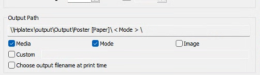
....I am going to drive to the shop right now and check. We use the hot folder that onyx is pointed at in the config printer menu. My plan was to change this so and output to a staging folder first, make the jdf edit, then transfer to the output folder.

I think I know what setting you're talking about on the HP but I can't remember if it is toggled on or not. Is it not tied to the output folder? My remote connection is down so I need to drive there to check, BRB
 

Attachments

  • 2026-01-10 16_57_52.png
    2026-01-10 16_57_52.png
    45.5 KB · Views: 6

Lunar Graphix

Button Pusher
....I am going to drive to the shop right now and check. We use the hot folder that onyx is pointed at in the config printer menu. My plan was to change this so and output to a staging folder first, make the jdf edit, then transfer to the output folder.

I think I know what setting you're talking about on the HP but I can't remember if it is toggled on or not. Is it not tied to the output folder? My remote connection is down so I need to drive there to check, BRB
oh my god it worked. You are a legend!
 

Lunar Graphix

Button Pusher
Now that I've confirmed this is possible. My question is how do we configure onyx to do this? I've got a ticket open with their support, but wondering if anyone here knows?
 
Top