• I want to thank all the members that have upgraded your accounts. I truly appreciate your support of the site monetarily. Supporting the site keeps this site up and running as a lot of work daily goes on behind the scenes. Click to Support Signs101 ...

Discussion I've owned an HP R1000 since April 2019, ask me anything

balstestrat

Problem Solver
....I am going to drive to the shop right now and check. We use the hot folder that onyx is pointed at in the config printer menu. My plan was to change this so and output to a staging folder first, make the jdf edit, then transfer to the output folder.

I think I know what setting you're talking about on the HP but I can't remember if it is toggled on or not. Is it not tied to the output folder? My remote connection is down so I need to drive there to check, BRB
Funny thing but I just noticed in the newest drivers there is an option below the options in your image for "printer handles copies" or so.
That would probably do exactly what you want straight from Onyx.

Not sure if your driver has that option tho.

1768380964864.png
 

sbergman

New Member
Hi,

I have owned the R1000 for just over 4 years. The maintenance for White SMK (white service maintenance kit) just came up and HP quoted $8,500 to send a technician to come out to perform the service. My understanding is that they rebuild the entire white system and the machine is down for 1-2 days. I am L2 trained, but they will not sell the parts to resellers or customers. For better or worse, this has to be done by HP according to HP. We have had slow years and probably don't use the machine as much as other companies, so I am a little hesitant to perform a service based on time rather than ink throughput, or total hours of usage, etc. For anyone interested I have purchased a total of 56 boxes of white ink so roughly 168L have passed through the machine give or take.

My question is whether anyone has had this white SMK performed by HP (around how long after initiating the machine) or has had a bad experience by delaying the maintenance and regretted their decision to postpone.

 

balstestrat

Problem Solver
Hi,

I have owned the R1000 for just over 4 years. The maintenance for White SMK (white service maintenance kit) just came up and HP quoted $8,500 to send a technician to come out to perform the service. My understanding is that they rebuild the entire white system and the machine is down for 1-2 days. I am L2 trained, but they will not sell the parts to resellers or customers. For better or worse, this has to be done by HP according to HP. We have had slow years and probably don't use the machine as much as other companies, so I am a little hesitant to perform a service based on time rather than ink throughput, or total hours of usage, etc. For anyone interested I have purchased a total of 56 boxes of white ink so roughly 168L have passed through the machine give or take.

My question is whether anyone has had this white SMK performed by HP (around how long after initiating the machine) or has had a bad experience by delaying the maintenance and regretted their decision to postpone.
It's every 4 years.
I've seen some units since beginning without it and no big issues so far. Just if I was you I'd replace the "consumables" ex. Fi towers for printheads, dummies yellow pieces, rubbers in the wheel, captops etc.
You also need to purchase more IT tanks, that's a no brainer or it will explode one day.
 
  • Agree
Reactions: 1 users

MarcusDude

New Member
Hi Everyone,
I have had the R1000 a few years now. The question has come up a few times to see if we could run the overcoat in select spots on the print to try to get a little extra gloss in those spots. I've said no in the pass it seemed like you run it on the whole print or not at all. Has anyone tried this or know if its even possible. I am currently using Onyx 25

Thanks,
 

balstestrat

Problem Solver
Hi Everyone,
I have had the R1000 a few years now. The question has come up a few times to see if we could run the overcoat in select spots on the print to try to get a little extra gloss in those spots. I've said no in the pass it seemed like you run it on the whole print or not at all. Has anyone tried this or know if its even possible. I am currently using Onyx 25

Thanks,
No, you can't do it.
 

Lunar Graphix

Button Pusher
Funny thing but I just noticed in the newest drivers there is an option below the options in your image for "printer handles copies" or so.
That would probably do exactly what you want straight from Onyx.

Not sure if your driver has that option tho.

View attachment 180608
Interesting. I'll check what version of onyx the shop is on. Can't see the option in your screenshot but I believe I know where that settings area is
 

MarcusDude

New Member
Hi All,
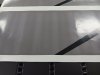
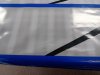
I'm trying to print gray with a white backup on colored material on the the R1000. And I'm getting these large vertical banding lines. I was wondering if anyone has seen this or knows what can cause it. I've tried different profiles and pass counts with different percentages of white. They all seem to come out roughly the same.
Thanks.
 

Attachments

  • 1000012977.jpg
    1000012977.jpg
    655.8 KB · Views: 12
  • 1000012979.jpg
    1000012979.jpg
    841 KB · Views: 12

JRF

New Member
Hi All,
I'm trying to print gray with a white backup on colored material on the the R1000. And I'm getting these large vertical banding lines. I was wondering if anyone has seen this or knows what can cause it. I've tried different profiles and pass counts with different percentages of white. They all seem to come out roughly the same.
Thanks.
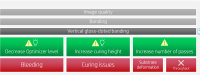
Try these troubleshooting steps, i would focus on the curing height first:

1775215482276.png
 

MarcusDude

New Member
So on the printheads double checked for head dropout. I replaced one of the op heads it wasn't that old but it was missing a lot of nozzles that wouldn't come back. And after that we tried again with decreasing and increasing the OP level. We did try moving the curing level up and more passes. Doesn't really change it. We did notice you can see the lines forming before it hits the curing module. They seem to line up with the edges of the vents behind the print carriage. So we tried less heat and air flow as well as more heater and air flow in that zone. But they are still showing up.
 

KMRamsay

New Member
I have had this exact same issue when printing a solid color 3-layer sandwich. The only thing that fixed it was to lower the density of my process color. You are correct in that the banding lines up with the airflow jets in the print zone, however after spending many hours with HP on the phone testing and retesting the curing and drying temperatures as well as airflow pressure... nothing fixes the issue except for lowering the density of the ink.

I never actually got a real answer from HP on why it does that.

I used to run solid color 3-layer with a 120-120 160W profile, but I had to switch to 100-120 W60 to get rid of the problem. It could be either lesser white ink or process color on top that fixed it, but it's gone for the moment.
 
Top