• I want to thank all the members that have upgraded your accounts. I truly appreciate your support of the site monetarily. Supporting the site keeps this site up and running as a lot of work daily goes on behind the scenes. Click to Support Signs101 ...

Looking for some assistance...

Thyezer

New Member
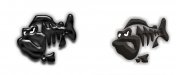
I have been asked to create a duplicate of the image for a customer to be used for making vinyl stickers, silk screening, and embroidery...

I explained that some designs are not as compatible with those three options...

Of course his original design was done in FIREWORKS and now I am to create it in Corel...

My problem is... Can Corel duplicate some of the bevels his design has?

I have posted both his original and my duplicate so far...

I am having troubles "blending the bevel" to look more natural...and is there a way to create the white highlight without manually drawing them?

Thanks for any help...

Andy
 

Attachments

  • NEED HELP EXAMPLE.jpg
    NEED HELP EXAMPLE.jpg
    20 KB · Views: 4

Thyezer

New Member
Oh...well if you think it is gay..then by all means I better call the customer and cancel his request! :)

And that is the point...I have forgotten about all of the bevels and P-shop effects... that's why I figured you could help out :)

Andy
 

WhiskeyDreamer

Professional Snow Ninja
you could always create the bevels in photopaint and save them as black and white tiffs....set them in corel and you should be able to print the decals and positives for screen printing...as for embroidery, i don't think you can recreate the bevels.
 

Thyezer

New Member
No... he specifically asked for the bevels to be smoother and to make sure that the light reflection was there...

I am just asking (again) is it available in Corel as a function, or do I have to create it manually with transparencies and drawn shapes?

Hopefully I will find out before my 5855th post... since that is how long it apparently will have taken you :)
Just playin' with ya Shovel... I really do appreciate your (or anyone's) help.

Andy
 

WhiskeyDreamer

Professional Snow Ninja
sorry for not knowing corel very well....i only use it when i have to...and it works when i need to set up bevels for a positive....at least i gave a suggestion...you told him not to recreate....;)
 

Thyezer

New Member
Thanks fenris....

You did offer a solution and I am thankful.

But, I am still hoping that Shovel will put down his copy of "How to type with only your left hand" and respond with a real genius answer that we all know he is capable of. Unless he is waiting for someone else to come along and teach us both? :)

While I will admit that my favorite designs are not just duplicates of a customer's logo, I still do this for money...and this time...the money only gets transferred into my pocket if the customer gets what he is asking for... bevels, fades, shadows and all.

.noitacinummoc eht htiw elbuort emos si ereht esac ni sdrawkcab siht ginpyt ma I
 

Thyezer

New Member
Kinda like reading the backside of a one-sided banner!
 

Attachments

  • ANSWER THE QUESTION.png
    ANSWER THE QUESTION.png
    33.7 KB · Views: 4

R08

New Member
Filter Forge can do this. It's a PS plugin but it works with Corel also.

If you send me the file I can try it for you. Or you can download a free 30 day trial and try it yourself.

Their ad is on the left side of this page
 

R08

New Member
Your welcome,

You will have to look for the right filters.. There's only about 4000 of them. lol

But you can search by keyword
 

R08

New Member
I've also done similar things with the mesh fill tool in Corel but it's more work
 

weaselboogie

New Member
I think what is making this look bad is the eyes. They're both looking up and one of those eyes are doing their own thing. The one on the left has WAY too much drop shadow or outer glow. But the last thing you will need to work on is your attitude. You're should be asking for help, not DEMANDING it.
 
Top