Goooost
New Member
I use the Mimaki UJV100-160 with rasterlink to print ungodly amounts of banners. So I'll let it go and start winding up a roll of prints while I do other things. But when it crashes, I come back and flat out can't see how far along it got. I dont know if I have 10 more banners to print or 30 or what- not without unrolling the banners and counting them that is.
I'm new to this kind of large format printing; my previous print shop focused on narrow format copiers and we could always tell exactly where they left off. I could tell from the printer itself or the PC software without hassle.
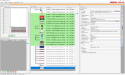
In rasterlink I see that the job color-coded to magenta, and in the log down below it shows that there was an error in red. That's it. No useful information for me whatsoever. No option to resume either. When it's actively printing a job it still doesn't tell me how many pages it's done, but it does at least show me a percentage I can extrapolate from. But once it jams that is all cleared out. What am I missing?
Thanks for your help.
I'm new to this kind of large format printing; my previous print shop focused on narrow format copiers and we could always tell exactly where they left off. I could tell from the printer itself or the PC software without hassle.
In rasterlink I see that the job color-coded to magenta, and in the log down below it shows that there was an error in red. That's it. No useful information for me whatsoever. No option to resume either. When it's actively printing a job it still doesn't tell me how many pages it's done, but it does at least show me a percentage I can extrapolate from. But once it jams that is all cleared out. What am I missing?
Thanks for your help.