
-
I want to thank all the members that have upgraded your accounts. I truly appreciate your support of the site monetarily. Supporting the site keeps this site up and running as a lot of work daily goes on behind the scenes. Click to Support Signs101 ...
- Forums
- Classified Advertisements
- Member to Member Classified Advertisements
- Member to Member Classifieds • Help Wanted
You are using an out of date browser. It may not display this or other websites correctly.
You should upgrade or use an alternative browser.
You should upgrade or use an alternative browser.


Smoke_Jaguar
Man who touches printers inappropriately.
Smoke_Jaguar
Man who touches printers inappropriately.
They have a demo you can try on their site. Futuresoft is the vendor.
Smoke_Jaguar
Man who touches printers inappropriately.
I mean it's just glorified gcode over serial, can run it on old or new hardware as you please.

Attila Nagy
New Member
Can USE USB-Parallel or USB-Serial + NULL MODEM cables.What are my cable connections as I have no idea about rx and tx
For parallel most cables work, but not all.
For Serial need to have Cross Linked NULL MODEM cable. Baud rate and serial settings set same both cutter and software.
On the CUTTER close I/O to AUTO and COMMAND to MODE2.

Ian Stewart-Koster
Older Greyer Brushie
search PNC1000 here. I posted a heap of info 20 years ago.
BUT I could not get ours going on anything newer than win 7 on a 32 bit system.
BUT I could not get ours going on anything newer than win 7 on a 32 bit system.
Attila Nagy
New Member
Do not look for driver. Cutting Softwares send the commands Directly to the port. You can connect cutters to Any Windows or mac Systems. Roland Cutstudio is not a Cutting software. It is only a skin for Printer driver.search PNC1000 here. I posted a heap of info 20 years ago.
BUT I could not get ours going on anything newer than win 7 on a 32 bit system.
Proper cabling, and real Cutting software the key.
All 3rd party softwares support Roland commands.
Attila Nagy
New Member
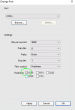
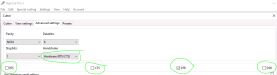
Check Flow control settings, some Roland cutters do not have all flow control pins connected. It can be solved in software, or with special cable. Not all softwares have full control over RS232. Set Flow Control to HardWire and COMMAND to Mode2 on the cutter.
Just a few examples:

Just a few examples:
