
-
I want to thank all the members that have upgraded your accounts. I truly appreciate your support of the site monetarily. Supporting the site keeps this site up and running as a lot of work daily goes on behind the scenes. Click to Support Signs101 ...
You are using an out of date browser. It may not display this or other websites correctly.
You should upgrade or use an alternative browser.
You should upgrade or use an alternative browser.
Shadow letters
- Thread starter maximumsign
- Start date


Jillbeans
New Member
I can come over and paint that for ya....
You can also do it with Corel. (I am a relative newbie to it and have Corel 9)
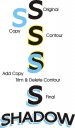
Type in your word.
Kern it if needed.
Convert it to curves.
Make a copy of it (ctrl C) and paste it (ctrl V) beside where you want the shadow. Usually it's down and to the left. Make this a different color for sight purposes.
Put a smallish contour on the original word. Separate it.
Select it, (contour) and use the trim function to trim the copied text.
I usually go to wireframe in this part, and I save both the trimmed and the originals till I get what I want.
Delete the contour.
What you should have is a fairly authentic-looking drop shadow.
I hope that made sense!
Love.....Jill



SignProOhio
New Member
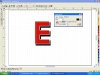
Flexi has an option for this type of shadow. You have to have design central open though. It's under drop shadow and in the design central there are a few different variations of shadows and the shadow you are looking for is one of them. You can customize the distance from the letter you want your shadow to go as well as the thickness. I'll post a screenshot as to what I'm talking about.
Attachments
Last edited:



Signguyno1
New Member
There is nothing like the old school, blended shade or the blended split shade, complete with highlight, all done with a brush. AH, memories are made of this! That is what signwriters are made of!

Ken
New Member
Here's a variation...
I've seen this around my area and it is almost a "signature mark" from another sign shop nearby. I just figured it out now. ( In Corel X3)
Make your text. Make a copy. Drag the copy away.
Contour first text with a thin black outline. Make the copy text black also.
Drag it behind the first text.
See that the text is outlined and also shadowed.
If you want the white space, just change the contour to white..or the background colour (after separating from the first text). If it is a cut-vinyl sign, the first contour and second text need to be welded together.
Ken
Attachments

maximumsign
New Member
I think after showing him 25 or 30 different shadows I have come to the conclusion the coustumer don't know what he wants himself. I mostly do racecars and I know how to shadow stuff to make the letters look thick or blocked. This guy keeps talking about the way some guy use to paint his letters on his trucks. I am about to get fustrated with him but the client is always right. lol
Thanx for the help guys I am going to show him some of the stuff you all posted and see if any of it suits him if so I will have something to go on besides his drawings.
later
Al
Thanx for the help guys I am going to show him some of the stuff you all posted and see if any of it suits him if so I will have something to go on besides his drawings.
later
Al